DCloud (uniapp) 插件集成文档
更新时间:2026-08-03 14:49:42
注:「插件市场地址」
创建应用
应用的创建流程及APPID的获取,请查看「账号创建」文档
注意:如果应用有多个包名或签名不同的马甲包,须创建多个对应包名和签名的应用,否则马甲包将报包名或签名校验不通过。
合规性说明
引用方式
const shanYanSDKModule = uni.requireNativePlugin('CLSDK-ShanYanSDKModule')
Android 部分
一、免密登录 API 使用说明
1.初始化
调用 SDK 其他流程方法前,请确保已调用过初始化,否则会返回未初始化。(会采集信息,建议放到同意协议后调用)
调用示例
shanYanSDKModule.init({ appid: "您的创建应用时生成的appid", }, result => { //初始化回调 this.shanyan_code = JSON.stringify(result.code); this.shanyan_result = JSON.stringify(result.result); });
参数描述
| 参数 | 类型 | 说明 |
|---|---|---|
| appId | String | 闪验平台获取到的 appId |
返回参数含义如下:
| 字段 | 类型 | 含义 |
|---|---|---|
| code | Int | code 为 1022:成功;其他:失败 |
| result | String | 返回信息 |
2.预取号
- 【可选方法】获取取号临时凭证;建议在调用拉起授权页前 2-3 秒调用,可以缩短拉起授权页耗时;如果启动 app 就需要展示授权页,中间没有 2~3 秒的间隔,不建议调用,起不到缩短时间的效果。
- 请勿与拉起授权登录页同时或之后调用。
- 避免大量资源下载时调用,例如游戏中加载资源或者更新补丁的时
调用示例:
shanYanSDKModule.getPhoneInfo((result) => { //预取号回调 this.shanyan_code = JSON.stringify(result.code); this.shanyan_result = JSON.stringify(result.result); });
返回参数含义如下:
| 字段 | 类型 | 含义 |
|---|---|---|
| code | Int | code 为 1022:成功;其他:失败 |
| result | String | 返回信息 |
3.拉起授权页&获取 token
- 拉起授权页方法将会调起运营商授权页面。已登录状态请勿调用 。
- 每次调用拉起授权页方法前均需先调用授权页配置方法,否则授权页可能会展示异常。
- 必须保证上一次拉起的授权页已经销毁再调用,否则 SDK 会返回请求频繁。
- 拉起一次授权页,登录按钮最多只能点击 4 次,第五次默认会置灰,不返回信息。
调用示例:
shanYanSDKModule.openLoginAuth(isFinish, result => { //拉起授权页回调 this.shanyan_code = JSON.stringify(result.code); this.shanyan_result = JSON.stringify(result.result); }, result => { //点击登录按钮及返回键回调 this.shanyan_code = JSON.stringify(result.code); this.shanyan_result = JSON.stringify(result.result); });
参数描述
| 字段 | 类型 | 含义 |
|---|---|---|
| isFinish | boolean | 点击授权页一键登录按钮有回调时是否自动销毁授权页:true:自动销毁 false:不自动销毁,开发者需主动调用销毁授权页方法进行授权页销毁操作 |
第一个回调返回参数含义如下:
| 字段 | 类型 | 含义 |
|---|---|---|
| code | int | code 为 1000:授权页成功拉起其他:失败 |
| result | String | 返回信息 |
第二个回调返回参数含义如下:
| 字段 | 类型 | 含义 |
|---|---|---|
| code | int | code 为 1011:点击返回按钮(包括物理返回键)code 为 1000:点击一键登录获取 token 成功其他:点击一键登录获取 token 失败 |
| result | String | 返回信息 |
当第二个回调外层 code 为 1000 时,result 的返回为
{ "token": "" }
含义如下:
| 字段 | 类型 | 含义 |
|---|---|---|
| token | String | 用来和后台置换手机号。一次有效。 |
4.置换手机号
当一键登录外层 code 为 1000 时,会获取到置换手机号所需的 token。请参考「服务端」文档来实现获取手机号码的步骤
5.其他 api
a.设置 log 开关
shanYanSDKModule.setDebug(true);
注:需要放到 SDK 初始化之前调用,用 ProcessShanYanLogger 可以过滤方法调用及回调等信息,用 UIShanYanTask 可以过滤 UI 配置相关日志,用 ActivityLifecycleShanYanTask 可以过滤界面生命周期相关日志。
b.设置 loading 显示状态
点登录按钮时默认会显示 loading,本方法可在 loading 显示后改变 loading 状态时调用
shanYanSDKModule.setLoadingVisibility(true);
参数描述
| 参数 | 类型 | 说明 |
|---|---|---|
| visibility | boolean | 点击一键登录后,授权页展示的 loading view(设置 true 显示;false 隐藏) |
c.设置协议勾选框状态
shanYanSDKModule.setCheckBoxValue(true);
参数描述
| 参数 | 类型 | 说明 |
|---|---|---|
| isChecked | boolean | 设置协议复选框是否选中(设置 true 选中;false 未选中) |
d.清理预取号缓存
shanYanSDKModule.clearScripCache();
e.获取运营商类型
shanYanSDKModule.getOperatorType((result) => { //预取号回调 this.shanyan_code = JSON.stringify(result); });
返回值 4 种:CMCC、CUCC、CTCC、UNKNOWN_OPERATOR;
释义:CMCC(移动);CUCC(联通);CTCC(电信); Unknown_Operator(无 SIM 卡或非三网运营商)
f.设置预取号超时时间
shanYanSDKModule.setTimeOutForPreLogin(5);
参数描述
| 参数 | 类型 | 说明 |
|---|---|---|
| time | int | 超时时间;单位秒,不设置默认 4 |
注:不建议设置小于 4 的值,否则可能会导致超时的概率增加。
g.获取运营商信息
shanYanSDKModule.getOperatorInfo();
返回示例:
{"telecom":"CTCC", "protocolName":"天翼服务及隐私协议", "protocolUrl":"https:\/\/e.189.cn\/sdk\/agreement\/detail.do?hidetop=true"}
返回信息描述
| 字段 | 类型 | 含义 |
|---|---|---|
| telecom | String | 四种情况:CMCC(移动);CUCC(联通);CTCC(电信); Unknown_Operator(无 SIM 卡或非三网运营商) |
| protocolName | String | 当前流量卡对应的协议名称 |
| protocolUrl | String | 当前流量卡对应的协议链接 |
h.协议点击事件监听
需要对协议点击事件监听的用户,可调用此方法监听协议点击事件,无此需求可以不写。
调用示例
shanYanSDKModule.setActionListener((result) => { //点击协议回调 this.shanyan_type = JSON.stringify(result.type); this.shanyan_code = JSON.stringify(result.code); this.shanyan_message = JSON.stringify(result.message); });
getOnClickPrivacyStatus(int code, String result,String operator)方法返回参数含义如下:
| 字段 | 类型 | 含义 |
|---|---|---|
| type | int | type=1 ,隐私协议点击事件 type=2 ,checkbox 点击事件 type=3 ,一键登录按钮点击事件 |
| code | int | type=1 ,隐私协议点击事件,code 分为 0,1,2,3(协议页序号)type=2 ,checkbox 点击事件,code 分为 0,1(0 为未选中,1 为选中)type=3 ,一键登录点击事件,code 分为 0,1(0 为协议未勾选时,1 为协议勾选时) |
| message | String | 点击事件的详细信息 |
i.授权页点击事件监听
需要对授权页点击事件监听的用户,可调用此方法监听授权页点击事件,无此需求可以不写。
调用示例
shanYanSDKModule.setActionListener((result) => { //点击协议回调 this.shanyan_type = JSON.stringify(result.type); this.shanyan_code = JSON.stringify(result.code); this.shanyan_message = JSON.stringify(result.message); });
getOnClickPrivacyStatus(int code, String result,String operator)方法返回参数含义如下:
| 字段 | 类型 | 含义 |
|---|---|---|
| type | int | type=1 ,隐私协议点击事件 type=2 ,checkbox 点击事件 type=3 ,一键登录按钮点击事件 |
| code | int | type=1 ,隐私协议点击事件,code 分为 0,1,2,3(协议页序号)type=2 ,checkbox 点击事件,code 分为 0,1(0 为未选中,1 为选中)type=3 ,一键登录点击事件,code 分为 0,1(0 为协议未勾选时,1 为协议勾选时) |
| message | String | 点击事件的详细信息 |
j.销毁授权页
A.自动销毁
1.在授权登录页面,当用户主动点击左左上角返回按钮时,返回码为 1011,授权页面将自动销毁授权页;
2.当用户点击物理返回键返回键(相当于取消登录),返回码为 1011,授权页面将自动销毁授权页
3.当用户设置一键登录或者其他自定义控件为自动销毁时,得到回调后,授权页面将自动销毁
B.手动销毁
调用示例
shanYanSDKModule.finishAuthActivity();
注意:销毁授权页时,请不要在销毁后回到的界面主线程中做耗时操作,避免堵塞授权页 onDestroy 方法,导致再次调用拉起授权页时报请求频繁。
6.授权页界面配置
a.设计规范
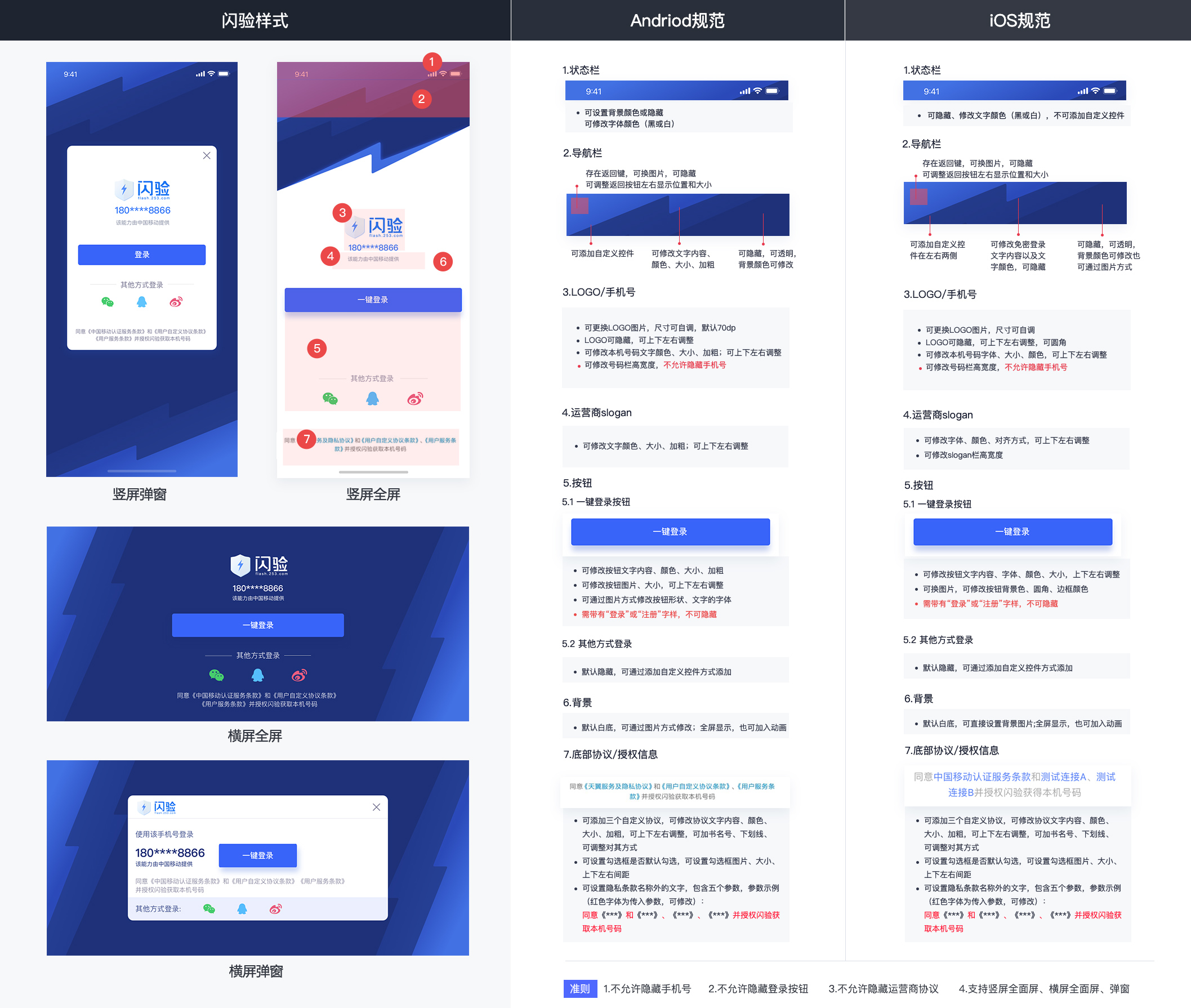
闪验登录授权界面设计规范
注意:开发者不得通过任何技术手段,将授权页面的登录按钮、隐私栏、号码栏内容隐藏、覆盖,对于接入闪验 SDK 并上线的应用,我方和运营商会对授权页面做审查,如果有出现未按要求设计授权页面,我方有权将应用的一键登录功能下线。
b.授权页配置
调用该方法可实现对三网运营商授权页面个性化设计,配置一次有效,每次调用拉起授权页方法前必须先调用该方法,否则授权界面会展示异常,具体实现可参考 demo 示例的 ConfigUtils 配置类。(三网界面配置内部实现逻辑不同,请务必使用移动、联通、电信卡分别测试)
调用示例:
shanYanSDKModule.setAuthThemeConfig({ //授权页已有元素配置 uiConfig: { setAuthBGImgPath: "static/eb9a0dae18491990a43fe02832d3cafa.jpg", setNavColor: '#ff0000', setNavText: "", setNavTextSize: "0", setFullScreen: "true", setNavReturnImgPath: "static/close_black.png", setNavReturnBtnOffsetRightX: "15", setLogoImgPath: 'static/logo_shanyan_text.png', setLogoOffsetY: "15", setLogoWidth: "110", setLogoHeight: "60", setNumFieldOffsetY: "80", setNumberSize: "18", setLogBtnText: "本机号码免密登录", setLogBtnOffsetY: "140", setLogBtnBackgroundColor:"#664455", setPrivacyState: "true", setAppPrivacyOne: { title: '闪验用户协议', url: "https://api.253.com/api_doc/yin-si-zheng-ce/wei-hu-wang-luo-an-quan-sheng-ming.html" }, setAppPrivacyTwo: { title: '闪验隐私政策', url: "https://api.253.com/api_doc/yin-si-zheng-ce/ge-ren-xin-xi-bao-hu-sheng-ming.html" }, setAppPrivacyThree: { title: '服务协议', url: "https://api.253.com/api_doc/yin-si-zheng-ce/ge-ren-xin-xi-bao-hu-sheng-ming.html" }, setPrivacyText: { privacyTextOne: '登录即同意', privacyTextTwo: "、", privacyTextThree: '、', privacyTextFour: '和', privacyTextFive: '并授权登录' }, setSloganHidden: "true", setDialogTheme: { width: "300", height: "400", marginLeft: "0", marginTop: "0", isBottom: "false" } }, //授权页添加自定义控件元素 widgets: { widget1: { widgetId: "customView_one", type: "TextView", left: "", top: "195", right: "", bottom: "", width: "", height: "30", textContent: "自定义控件(不销毁授权页)", textFont: "13", textColor: "#cc0000", backgroundColor: "#ffffff", isFinish: "false" }, widget2: { widgetId: "customView_two", type: "ImageView", left: "", top: "230", right: "", bottom: "", width: "30", height: "30", backgroundImgPath: "static/qq.png", isFinish: "true" } }, }, //授权页添加自定义控件元素点击事件监听 result => { console.log(JSON.stringify(result)); });
ShanYanUIConfig.java 配置元素说明
授权页背景
String setAuthBGImgPath; //普通图片
授权页状态栏
bool setLightColor; //设置状态栏字体颜色是否为白色 String setStatusBarColor; //设置状态栏背景颜色 bool setStatusBarHidden; // 设置状态栏是否隐藏 bool setVirtualKeyTransparent; //设置虚拟键是否透明 bool setFullScreen;//设置是否全屏,会隐藏底部虚拟按键
授权页导航栏
String setNavColor; //设置导航栏背景颜色 String setNavText; //设置导航栏标题文字 String setNavTextColor; //设置导航栏标题文字颜色 int setNavTextSize; //设置导航栏标题文字大小 String setNavReturnImgPath; //设置导航栏返回按钮图标 bool setNavReturnImgHidden = false; //设置导航栏返回按钮是否隐藏(true:隐藏;false:不隐藏) int setNavReturnBtnWidth; //设置导航栏返回按钮宽度 int setNavReturnBtnHeight; //设置导航栏返回按钮高度 int setNavReturnBtnOffsetRightX; //设置导航栏返回按钮距离屏幕右侧X偏移 int setNavReturnBtnOffsetX; //设置导航栏返回按钮距离屏幕左侧X偏移 int setNavReturnBtnOffsetY; //设置导航栏返回按钮距离屏幕上侧Y偏移 bool setAuthNavHidden; //设置导航栏是否隐藏(true:隐藏;false:不隐藏) bool setAuthNavTransparent; //设置导航栏是否透明(true:透明;false:不透明) bool setNavTextBold; // 设置导航栏字体是否加粗(true:加粗;false:不加粗)
授权页 logo
String setLogoImgPath; //设置logo图片 int setLogoWidth; //设置logo宽度 int setLogoHeight; //设置logo高度 int setLogoOffsetY; //设置logo相对于标题栏下边缘y偏移 int setLogoOffsetBottomY; //设置logo相对于屏幕底部y偏移 bool setLogoHidden; //设置logo是否隐藏(true:隐藏;false:不隐藏) int setLogoOffsetX; //设置logo相对屏幕左侧X偏移
授权页号码栏
String setNumberColor; //设置号码栏字体颜色 int setNumFieldOffsetY; //设置号码栏相对于标题栏下边缘y偏移 int setNumFieldOffsetBottomY; //设置号码栏相对于屏幕底部y偏移 int setNumFieldWidth; //设置号码栏宽度 int setNumFieldHeight; //设置号码栏高度 int setNumberSize; //设置号码栏字体大小 int setNumFieldOffsetX; //设置号码栏相对屏幕左侧X偏移 bool setNumberBold; //设置号码栏字体是否加粗(true:加粗;false:不加粗) bool setTextSizeIsdp; //设置整个授权页字体单位是否是dp
授权页登录按钮
String setLogBtnText; //设置登录按钮文字 String setLogBtnTextColor; //设置登录按钮文字颜色 String setLogBtnBackgroundColor; //设置登录按钮背景颜色 String setLogBtnImgPath; //设置授权登录按钮图片 int setLogBtnOffsetY; //设置登录按钮相对于标题栏下边缘Y偏移 int setLogBtnOffsetBottomY; //设置登录按钮相对于屏幕底部Y偏移 int setLogBtnTextSize; //设置登录按钮字体大小 int setLogBtnHeight; //设置登录按钮高度 int setLogBtnWidth; //设置登录按钮宽度 int setLogBtnOffsetX; //设置登录按钮相对屏幕左侧X偏移 bool setLogBtnTextBold //设置登录按钮字体是否加粗(true:加粗;false:不加粗)
授权页隐私栏
List<String> setAppPrivacyOne; //设置开发者隐私条款1,包含两个参数:1.title:名称2.URL:链接 setAppPrivacyOne:{ title:'用户协议1', url:"http://flash.253.com/" }, List<String> setAppPrivacyTwo; //设置开发者隐私条款2,包含两个参数:1.title:名称2.URL:链接 setAppPrivacyTwo:{ title:'用户协议1', url:"http://flash.253.com/" }, List<String> setAppPrivacyThree; //设置开发者隐私条款3,包含两个参数:1.title:名称2.URL:链接 setAppPrivacyThree:{ title:'用户协议1', url:"http://flash.253.com/" }, bool setPrivacySmhHidden; //设置协议名称是否显示书名号《》,默认显示书名号(true:不显示;false:显示) int setPrivacyTextSize; //设置隐私栏字体大小 List<String> setAppPrivacyColor; //设置隐私条款文字颜色,包含两个参数:1.privacyBaseColor:基础文字颜色 2.privacyColor:协议文字颜色 setAppPrivacyColor:{ privacyBaseColor:'#ffffff', privacyColor:'#080808' }, int setPrivacyOffsetBottomY; //设置隐私条款相对于授权页面底部下边缘y偏移 int setPrivacyOffsetY; //设置隐私条款相对于授权页面标题栏下边缘y偏移 int setPrivacyOffsetX; //设置隐私条款相对屏幕左侧X偏移 list<int> setcheckBoxOffsetXY; //设置checkbox在协议框父控件中的位置,包含两个参数:1.x:x偏移量 2.y:y偏移量 setCheckBoxOffsetXY:{ x:'', y:'' }, bool setPrivacyTextBold; //设置协议栏字体是否加粗(true:加粗;false:不加粗) bool setPrivacyOffsetGravityLeft; //设置隐私条款文字左对齐(true:左对齐;false:居中) bool setPrivacyState; //设置进入授权页时,协议勾选框CheckBox默认选中状态(true:选中;false:未选中) String setUncheckedImgPath; //设置隐私条款的CheckBox未选中时图片 String setCheckedImgPath; //设置隐私条款的CheckBox选中时图片 bool setCheckBoxHidden; //设置隐私条款的CheckBox是否隐藏(true:隐藏;false:不隐藏) List<int> setCheckBoxWH; //设置checkbox的宽高,包含两个参数:1.width:宽 2.height:高 setCheckBoxWH:{ width:'', height:'' }, List<int> setCheckBoxMargin; //设置checkbox的间距,包含四个参数:1.marginLeft:左间距 2.marginTop:上间距 3.marginRight:右间距 4.marginBottom:下间距 setCheckBoxMargin:{ marginLeft:'', marginTop:'', marginRight:'', marginBottom:'' }, List<String> setPrivacyText; //设置隐私条款名称外的文字,包含五个参数(privacyTextOne,privacyTextTwo,privacyTextThree,privacyTextFour,privacyTextFive) setPrivacyText:{ privacyTextOne:'同意', privacyTextTwo:"、", privacyTextThree:'', privacyTextFour:'', privacyTextFive:"并授权登录" }, String setPrivacyCustomToastText; //未勾选协议时toast提示文字 bool setPrivacyNameUnderline; //协议是否显示下划线(true:显示;false:不显示) bool setOperatorPrivacyAtLast; //运营商协议是否为最后一个显示(true:最后显示;false:不在最后显示) bool setPrivacyGravityHorizontalCenter; //设置隐私协议栏是否居中显示(true:居中;false:居左)
授权页 slogan
String setSloganTextColor; //设置slogan文字颜色 int setSloganTextSize; //设置slogan文字字体大小 int setSloganOffsetY; //设置slogan相对于标题栏下边缘y偏移 bool setSloganHidden = false; //设置slogan是否隐藏(true:隐藏;false:不隐藏) int setSloganOffsetBottomY; //设置slogan相对屏幕底部Y偏移 int setSloganOffsetX; //设置slogan相对屏幕左侧X偏移
创蓝 slogan
//创蓝slogan设置 int setShanYanSloganOffsetY; //设置创蓝slogan相对于标题栏下边缘y偏移 int setShanYanSloganOffsetBottomY; //设置创蓝slogan相对屏幕底部Y偏移 int setShanYanSloganOffsetX; //设置创蓝slogan相对屏幕左侧X偏移 String setShanYanSloganTextColor; //设置创蓝slogan文字颜色 int setShanYanSloganTextSize; //设置创蓝slogan文字字体大小 bool setShanYanSloganHidden; //设置创蓝slogan是否隐藏(true:隐藏;false:不隐藏) bool setShanYanSloganTextBold; //设置创蓝slogan文字字体是否加粗(true:加粗;false:不加粗)
协议页导航栏
String setPrivacyNavColor; //设置协议页导航栏背景颜色 bool setPrivacyNavTextBold; //设置协议页导航栏标题文字是否加粗(true:加粗;false:不加粗) String setPrivacyNavTextColor; //设置协议页导航栏标题文字颜色 int setPrivacyNavTextSize; //设置协议页导航栏标题文字大小 String setPrivacyNavReturnImgPath; //设置协议页导航栏返回按钮图标 bool setPrivacyNavReturnImgHidden; //设置协议页导航栏返回按钮是否隐藏(true:隐藏;false:不隐藏) int setPrivacyNavReturnBtnWidth; //设置协议页导航栏返回按钮宽度 int setPrivacyNavReturnBtnHeight; //设置协议页导航栏返回按钮高度 int setPrivacyNavReturnBtnOffsetRightX; //设置协议页导航栏返回按钮距离屏幕右侧X偏移 int setPrivacyNavReturnBtnOffsetX; //设置协议页导航栏返回按钮距离屏幕左侧X偏移 int setPrivacyNavReturnBtnOffsetY; //设置协议页导航栏返回按钮距离屏幕上侧Y偏移
授权页弹窗样式
float setDialogDimAmount; //授权页遮盖层灰度设置范围是(0~1) List<String>setDialogTheme; //设置授权页为弹窗样式,包含5个参数:1.width:弹窗宽度 2.height:弹窗高度 3.marginLeft:弹窗X偏移量(以屏幕中心为原点) 4.marginTop:弹窗Y偏移量(以屏幕中心为原点) 5.isBottom:授权页弹窗是否贴于屏幕底部 setDialogTheme: { width: "300", height: "400", marginLeft: "0", marginTop: "0", isBottom: "false" }
自定义控件
String widgetId; //自定义控件ID String type; //自定义控件类型,目前只支持 TextView,ImageView int left = 0; // 自定义控件距离屏幕左边缘偏移量,单位dp int top = 0; // 自定义控件距离导航栏底部偏移量,单位dp int right = 0; // 自定义控件距离屏幕右边缘偏移量,单位dp int bottom = 0; // 自定义控件距离屏幕底部偏移量,单位dp int width = 0; // 自定义控件宽度,单位dp int height = 0; // 自定义控件高度,单位dp String textContent = ""; // type为TextView时,自定义控件内容 double textFont = 13.0; // type为TextView时,自定义控件文字大小,单位sp String textColor = "#aa0000"; // type为TextView时,自定义控件文字颜色 String backgroundColor; // type为TextView时,自定义控件背景颜色 String backgroundImgPath; // type为ImageView时 自定义控件背景图片 bool isFinish = true; //点击自定义控件是否自动销毁授权页
注意:
a.控件 X 偏移如果不设置默认居中。
二、本机认证 API 使用说明
注:本机认证、免密登录可共用初始化,两个功能同时使用时,只需调用一次初始化即可。
1.初始化
同**免密登录初始化**
2.本机号校验
在初始化执行之后调用,本机号校验界面需自行实现,可以在多个需要校验的页面中调用。
调用示例:
shanYanSDKModule.startAuthentication((result) => { uni.hideLoading(); this.shanyan_code = JSON.stringify(result.code); this.shanyan_result = JSON.stringify(result.result); });
返回参数含义如下:
| 字段 | 类型 | 含义 |
|---|---|---|
| code | int | code 为 2000:成功其他:失败 |
| result | String | 返回信息 |
当外层 code 为 2000 时,result 的返回为
{ "token": "" }
含义如下:
| 字段 | 类型 | 含义 |
|---|---|---|
| token | String | 用来和后台校验手机号。一次有效。 |
3.校验手机号
当本机号校验外层 code 为 2000 时,您将获取到返回的参数,请将这些参数传递给后端开发人员,并参考「服务端」文档来实现校验本机号的步骤
iOS 部分
前置条件
- 闪验 SDK 支持 Xcode 9.4.1,iOS8.0+及以上版本。
- 闪验 SDK 支持中国移动、联通、电信 4G 的取号能力。
- 闪验 SDK 支持网络环境为
a.纯数据网络
b.数据网络与 wifi 网络双开
- 对于双卡手机,闪验 SDK 取当前流量卡号
一、免密登录 API 使用说明
1.初始化
/**初始化*/ func init(option: callBack:)
参数描述
| 字段 | 参数 | 是否必填 | 类型 | 说明 |
|---|---|---|---|---|
| option | appId | 必填 | String | 闪验 appID |
| callBack | 选填 | CLComplete | 初始化回调 block,可以在此回调 block 中接收初始化情况,也可以不关心初始化结果 |
CLComplete:所有回调返回的统一形式,**errorCode 存在即失败,否则为成功**
| 字段 | 类型 | 说明 |
|---|---|---|
| code | Number | 外层 code |
| message | String | 外层描述(概要) |
| data | Object | 数据 |
| errorCode | Number | 内层 code(用于判断是否失败) |
| errorDomain | String | 外层描述 |
| errorUserInfo | Object | 错误详情 |
接口作用
**
初始化 SDK :传入用户的 appID、appKey,获取本机运营商,读取缓存,获取运营商配置,初始化 SDK
使用场景
**
- 建议在 app 启动时调用 即 App.vue 的 onLaunch 事件中
- 必须在一键登录前至少调用一次
- 只需调用一次,多次调用不会多次初始化,与一次调用效果一致
请求示例代码
const shanYanSDKModule = uni.requireNativePlugin('CLSDK-ShanYanSDKModule'); //调用 export default { onLaunch: function() { //初始化 shanYanSDKModule.init({ 'appid' : 'eWWfA2KJ' //'appkey' : 'tDo3Ml2K',//2.3.0及以上版本无需传入appkey },result => { console.log(JSON.stringify(result)); }); console.log('App Launch'); }, }
2.预取号
/** * 预取号(获取临时凭证) * 建议在判断当前用户属于未登录状态时使用,已登录状态用户请不要调用该方法 */ func preGetPhonenumber(callBack:CLComplete);
接口作用
电信、联通、移动预取号 :初始化成功后,如果当前为电信/联通/移动,将调用预取号,可以提前获知当前用户的手机网络环境是否符合一键登录的使用条件,成功后将得到用于一键登录使用的临时凭证,默认的凭证有效期 60min。
使用场景
- 建议在执行一键登录的方法前,提前一段时间调用此方法,比如调一键登录的 vc 的 onLoad 中,或者 rootVC 的 rootVC 中,或者 app 启动后,此调用将有助于提高闪验拉起授权页的速度和成功率
- 不建议调用后立即调用拉起授权页方法(此方法是异步)
- 此方法需要 1~2s 的时间取得临时凭证,因此也不建议和拉起授权页方法一起串行调用
- 不建议频繁的多次调用和在拉起授权页后调用
- 建议在判断当前用户属于未登录状态时使用,已登录状态用户请不要调用该方法
请求示例代码
import service from '../../service.js'; import { mapState, mapMutations } from 'vuex' import mInput from '../../components/m-input.vue' const shanYanSDKModule = uni.requireNativePlugin('CLSDK-ShanYanSDKModule'); //调用 export default { onLoad: function (option) { //预取号 shanYanSDKModule.preGetPhonenumber((complete) => { console.log(JSON.stringify(complete)); }); },
3.拉起授权页
//闪验一键登录接口 shanYanSDKModule.quickAuthLoginWithConfigure(clUIConfigure:openLoginAuthListener:oneKeyLoginListener:);
参数描述
| 参数 | 类型 | 说明 |
|---|---|---|
| clUIConfigure 必填 | CLUIConfigure | 授权页控件属性配置对象 |
| openLoginAuthListener选填 | CLComplete | 拉起授权页的回调,拉起页面成功失败均触发 |
| oneKeyLoginListener 必填 | CLComplete | 一键登录回调,用于接收一键登录的结果,点一键登录成功失败均触发,点自带的返回按钮也触发 |
使用场景
- 用户进行一键登录操作时,调用一键登录方法,如果初始化成功,SDK 将会拉起授权页面,用户授权后,SDK 将返回取号 token 给到应用客户端。
- 可以在多处调用
- 需在调用预初始化方法之后调用
一键登录逻辑说明
- 存在调用预初始化时获取的临时凭证,调用一键登录方法将立即拉起授权页面
- openLoginAuthListener 拉起授权页监听回调,拉起成功或失败均触发
- 不存在临时凭证或临时凭证过期时(临时凭证有效期电信 10min、联通 30min、移动 60min),调用一键登录方法,将有一个很短的时延,待取号成功后拉起授权页面
- 取号失败时,返回失败
请求示例代码
uni.showLoading({ mask: true, }) setTimeout(function () { uni.hideLoading(); }, 5000); //配置界面 //iOS 全屏模式 let screenWidth_Portrait = plus.screen.resolutionWidth; //竖屏宽 let screenHeight_Portrait = plus.screen.resolutionHeight; //竖屏宽 let screenWidth_Landscape = plus.screen.resolutionHeight; //横屏宽(即竖屏高) let screenHeight_Landscape = plus.screen.resolutionWidth; //横屏高(即竖屏宽) var screenScale = screenWidth_Portrait / 375.0; //相对iphone6屏幕 if (screenScale > 1) { screenScale = 1; //大屏的无需放大 } //竖屏 let clLayoutLogoTop_Portrait = screenScale * 60; let clLayoutLogoWidth_Portrait = 60 * screenScale; let clLayoutLogoHeight_Portrait = 60 * screenScale; let clLayoutLogoCenterX_Portrait = 0; let clLayoutPhoneCenterY_Portrait = -20 * screenScale; let clLayoutPhoneLeft_Portrait = 50 * screenScale; let clLayoutPhoneRight_Portrait = -50 * screenScale; let clLayoutPhoneHeight_Portrait = 20 * screenScale; let clLayoutLoginBtnCenterY_Portrait = clLayoutPhoneCenterY_Portrait + clLayoutPhoneHeight_Portrait * 0.5 * screenScale + 20 * screenScale + 15 * screenScale; let clLayoutLoginBtnHeight_Portrait = 30 * screenScale; let clLayoutLoginBtnLeft_Portrait = 70 * screenScale; let clLayoutLoginBtnRight_Portrait = -70 * screenScale; let clLayoutAppPrivacyLeft_Portrait = 40 * screenScale; let clLayoutAppPrivacyRight_Portrait = -40 * screenScale; let clLayoutAppPrivacyBottom_Portrait = 0 * screenScale; let clLayoutAppPrivacyHeight_Portrait = 45 * screenScale; let clLayoutSloganLeft_Portrait = 0; let clLayoutSloganRight_Portrait = 0; let clLayoutSloganHeight_Portrait = 15 * screenScale; let clLayoutSloganBottom_Portrait = clLayoutAppPrivacyBottom_Portrait - clLayoutAppPrivacyHeight_Portrait; shanYanSDKModule.quickAuthLoginWithConfigure(this.ios_uiConfigure, openLoginAuthListenerResult => { //拉起授权页面回调:调起授权页面成功/失败 uni.hideLoading(); //debug_test uni.showToast({ icon: "none", title: JSON.stringify(openLoginAuthListenerResult), duration: 3000 }); }, oneKeyLoginListenerResult => { uni.hideLoading(); //点一键登录回调 if (oneKeyLoginListenerResult.errorCode != null){ if(oneKeyLoginListenerResult.code == 1011){ //提示:错误无需提示给用户,可以在用户无感知的状态下直接切换登录方式 //用户取消登录(点返回) //处理建议:如无特殊需求可不做处理,仅作为交互状态回调,此时已经回到当前用户自己的页面 //点击sdk自带的返回,无论是否设置手动销毁,授权页面都会强制关闭 }else{ //处理建议:其他错误代码表示闪验通道无法继续,可以统一走开发者自己的其他登录方式,也可以对不同的错误单独处理 //1003 一键登录获取token失败 //其他 其他错误// //关闭授权页 shanYanSDKModule.finishAuthControllerCompletion(oneKeyLoginListenerResult => { }); } }else{ //SDK获取Token成功 //此处根据token调用户后台接口获取手机号,获取成功或失败后再调shanYanSDKModule.finishAuthControllerCompletion()关闭页面 // //关闭授权页 shanYanSDKModule.finishAuthControllerCompletion(oneKeyLoginListenerResult => { }); //debug_test uni.showToast({ icon: "none", title: JSON.stringify(oneKeyLoginListenerResult), duration: 3000 }); } }); }
一键登录 oneKeyLoginListenerResult:正确返回示例
{ "message": "获取联通token成功", "data": { "token": "A2-7NA_jWQuN0XsJsZQOY8BtvdKtrhNK9QStebzzyzgh7ElebpB8xGy3rapp4yyxX8-VEVgMhiB3wO4P0PnCZNjtPAZO9KfeODdYxhgn5Qn8vnxOvgk4_Ov_39d56-v1p87-IcFHKlji4nhvCd1VmrxOSHx6KB6i6lZqFYqGgcbKfpG-yaGL6pcY4T9mbrtsOpbUhrdamE7eA1KaruyOdkL1SThGJZt_-8imf91EyrXckg=" }, "code": 1000 }
4.销毁授权页
A.授权页面自动销毁
1.在授权登录页面,当用户主动点击左左上角返回按钮时,返回码为 1011,SDK 将自动销毁授权页;
2.当用户设置一键登录或者其他自定义控件为自动销毁时,得到回调后,授权页面会自动销毁
B.授权页手动销毁
1.当设置一键登录为手动销毁时,点击授权页一键登录按钮成功获取 token 不会自动销毁授权页,请务必在回调中处理完自己的逻辑后手动调用销毁授权页方法。
2.当设置自定义控件为手动销毁时,请务必在回调中处理完自己的逻辑后手动调用销毁授权页方法。
调用示例
shanYanSDKModule.finishAuthControllerCompletion();
5.置换手机号
当一键登录 oneKeyLoginListenerResult 回调 errorCode 为 null 时,您将获取到返回的参数,请将这些参数传递给后端开发人员,并参考「服务端」文档来实现获取手机号码的步骤。
6.授权页界面配置
调用该方法可实现对三网运营商授权页面个性化设计。(三网界面配置内部实现逻辑不同,请务必使用移动、联通、电信卡分别测试三网界面)
调用示例
简单竖屏全屏模式
//iOS 简单竖屏全屏模式 let screenWidth_Portrait = plus.screen.resolutionWidth; //竖屏宽 var screenScale = screenWidth_Portrait / 375.0; //相对iphone6屏幕 if (screenScale > 1) { screenScale = 1; //大屏的无需放大 } //先计算各控件位置及相对关系 //logo let clLayoutLogoTop_Portrait = screenScale * 60; let clLayoutLogoWidth_Portrait = 60 * screenScale; let clLayoutLogoHeight_Portrait = 60 * screenScale; let clLayoutLogoCenterX_Portrait = 0; //手机号 let clLayoutPhoneCenterY_Portrait = -20 * screenScale; let clLayoutPhoneLeft_Portrait = 50 * screenScale; let clLayoutPhoneRight_Portrait = -50 * screenScale; let clLayoutPhoneHeight_Portrait = 20 * screenScale; //一键登录按钮 let clLayoutLoginBtnCenterY_Portrait = clLayoutPhoneCenterY_Portrait + clLayoutPhoneHeight_Portrait * 0.5 * screenScale + 20 * screenScale + 15 * screenScale; let clLayoutLoginBtnHeight_Portrait = 30 * screenScale; let clLayoutLoginBtnLeft_Portrait = 70 * screenScale; let clLayoutLoginBtnRight_Portrait = -70 * screenScale; //隐私协议 let clLayoutAppPrivacyLeft_Portrait = 40 * screenScale; let clLayoutAppPrivacyRight_Portrait = -40 * screenScale; let clLayoutAppPrivacyBottom_Portrait = 0 * screenScale; let clLayoutAppPrivacyHeight_Portrait = 45 * screenScale; //运营商能力标签(认证服务由**提供) let clLayoutSloganLeft_Portrait = 0; let clLayoutSloganRight_Portrait = 0; let clLayoutSloganHeight_Portrait = 15 * screenScale; let clLayoutSloganBottom_Portrait = clLayoutAppPrivacyBottom_Portrait - clLayoutAppPrivacyHeight_Portrait; //ios_uiConfigure 用于传入一键登录方法 this.ios_uiConfigure = { clBackgroundImg: "static/img/eb9a0dae18491990a43fe02832d3cafa.jpg",//全屏背景 shouldAutorotate: false,//支持自动旋转 /**支持方向 * 如支持横竖屏,需同时设置 clOrientationLayOutPortrait 和 clOrientationLayOutLandscape * 0:UIInterfaceOrientationMaskPortrait//竖屏 * 1:UIInterfaceOrientationMaskLandscapeLeft//横屏左 * 2:UIInterfaceOrientationMaskLandscapeRight//横屏右 * 3:UIInterfaceOrientationMaskPortraitUpsideDown//上下倒置 * 4:UIInterfaceOrientationMaskLandscape//横屏左&右 * 5:UIInterfaceOrientationMaskAll//全部 * 6:UIInterfaceOrientationMaskAllButUpsideDown//全部但不包括上下倒置 * */ supportedInterfaceOrientations: 5, /**偏好方向 * -1:UIInterfaceOrientationUnknown * 0:UIInterfaceOrientationPortrait * 1:UIInterfaceOrientationPortraitUpsideDown * 2:UIInterfaceOrientationLandscapeLeft * 3:UIInterfaceOrientationLandscapeRight * */ //偏好方向默认Portrait preferredInterfaceOrientationForPresentation: Number(5), clNavigationBackgroundClear: true,//导航栏透明 clNavigationBackBtnImage: "static/img/close-white.png",//返回按钮图片,自带返回按钮大小将由1x图片大小决定 clNavBackBtnAlimentRight: true,//返回按钮居右 clLogoImage: "static/img/logo_shanyan_text.png",//logo图片 clLoginBtnText: "本机号一键登录",//一键登录按钮文字 clLoginBtnTextColor: [1,1,1,1.0],//rgba clLoginBtnBgColor: [0.2,0.8,0.2,1.0],//rgba clLoginBtnTextFont: 15*screenScale, clLoginBtnCornerRadius: 10, clLoginBtnBorderWidth: 0.5, clLoginBtnBorderColor: [0.1,0.8,0.1,1.0],//rgba clPhoneNumberFont: 20.0*screenScale,//手机号字体 clAuthTypeUseWindow: false,//弹窗模式 //clAuthWindowCornerRadius: 20,//弹窗模式下的窗口圆角 //隐私协议 clAppPrivacyColor: [[0.6,0.6,0.6,1.0],[0,1,0,1.0]],//2 item,commomTextColor and appPrivacyTextColor clAppPrivacyTextFont: 11*screenScale, clAppPrivacyTextAlignment: 0,//0: center 1: left 2: right clAppPrivacyFirst: ["测试连接A","https://www.baidu.com"],// 2 item, name and url clAppPrivacySecond: ["测试连接B","https://www.sina.com"],// 2 item, name and url //隐私协议勾选框 clCheckBoxVerticalAlignmentToAppPrivacyCenterY: true, clCheckBoxSize: [30*screenScale,30*screenScale],//2 item, width and height clCheckBoxImageEdgeInsets: [2*screenScale,10*screenScale,13*screenScale,5*screenScale],//4 item, top left bottom right clCheckBoxUncheckedImage: "static/img/checkBoxNor.png", clCheckBoxCheckedImage: "static/img/checkBoxSEL.png", //加载动画 clLoadingSize : [50, 50],//2 item, width and height clLoadingTintColor : [0.2,0.8,0.2,1], clLoadingBackgroundColor : [1,1,1,1], clLoadingCornerRadius : 5, //竖屏布局对象 clOrientationLayOutPortrait:{ //控件: //logo clLayoutLogoWidth : clLayoutLogoWidth_Portrait, clLayoutLogoHeight : clLayoutLogoHeight_Portrait, clLayoutLogoCenterX : clLayoutLogoCenterX_Portrait, clLayoutLogoTop : clLayoutLogoTop_Portrait, //手机号 clLayoutPhoneCenterY : clLayoutPhoneCenterY_Portrait, clLayoutPhoneHeight : clLayoutPhoneHeight_Portrait, clLayoutPhoneLeft : clLayoutPhoneLeft_Portrait, clLayoutPhoneRight : clLayoutPhoneRight_Portrait, //一键登录按钮 clLayoutLoginBtnCenterY : clLayoutLoginBtnCenterY_Portrait, clLayoutLoginBtnHeight : clLayoutLoginBtnHeight_Portrait, clLayoutLoginBtnLeft : clLayoutLoginBtnLeft_Portrait, clLayoutLoginBtnRight : clLayoutLoginBtnRight_Portrait, //隐私协议 clLayoutAppPrivacyLeft : clLayoutAppPrivacyLeft_Portrait, clLayoutAppPrivacyRight : clLayoutAppPrivacyRight_Portrait, clLayoutAppPrivacyBottom : clLayoutAppPrivacyBottom_Portrait, clLayoutAppPrivacyHeight : clLayoutAppPrivacyHeight_Portrait, //运营商能力标签(认证服务由**提供) clLayoutSloganLeft : clLayoutSloganLeft_Portrait, clLayoutSloganRight : clLayoutSloganRight_Portrait, clLayoutSloganHeight : clLayoutSloganHeight_Portrait, clLayoutSloganBottom : clLayoutSloganBottom_Portrait, }, }
横竖屏+弹窗+自动旋转模式
//iOS 弹窗模式 let screenWidth_Portrait = plus.screen.resolutionWidth; //竖屏宽 let screenHeight_Portrait = plus.screen.resolutionHeight; //竖屏宽 let screenWidth_Landscape = plus.screen.resolutionHeight; //横屏宽(即竖屏高) let screenHeight_Landscape = plus.screen.resolutionWidth; //横屏高(即竖屏宽) var screenScale = screenWidth_Portrait / 375.0; //相对iphone6屏幕 if (screenScale > 1) { screenScale = 1; //大屏的无需放大 } //竖屏 //窗口中心 let clAuthWindowOrientationCenterX_Portrait = screenWidth_Portrait * 0.5; let clAuthWindowOrientationCenterY_Portrait = screenHeight_Portrait * 0.5; //窗口宽高 let clAuthWindowOrientationWidth_Portrait = screenWidth_Portrait * 0.8; let clAuthWindowOrientationHeight_Portrait = clAuthWindowOrientationWidth_Portrait * 0.8; let clLayoutLogoTop_Portrait = screenScale * 25; let clLayoutLogoWidth_Portrait = 60 * screenScale; let clLayoutLogoHeight_Portrait = 60 * screenScale; let clLayoutLogoCenterX_Portrait = 0; let clLayoutPhoneCenterY_Portrait = -20 * screenScale; let clLayoutPhoneLeft_Portrait = 50 * screenScale; let clLayoutPhoneRight_Portrait = -50 * screenScale; let clLayoutPhoneHeight_Portrait = 20 * screenScale; let clLayoutLoginBtnCenterY_Portrait = clLayoutPhoneCenterY_Portrait + clLayoutPhoneHeight_Portrait * 0.5 * screenScale + 20 * screenScale + 15 * screenScale; let clLayoutLoginBtnHeight_Portrait = 30 * screenScale; let clLayoutLoginBtnLeft_Portrait = 70 * screenScale; let clLayoutLoginBtnRight_Portrait = -70 * screenScale; let clLayoutAppPrivacyLeft_Portrait = 40 * screenScale; let clLayoutAppPrivacyRight_Portrait = -40 * screenScale; let clLayoutAppPrivacyBottom_Portrait = 0 * screenScale; let clLayoutAppPrivacyHeight_Portrait = 45 * screenScale; let clLayoutSloganLeft_Portrait = 0; let clLayoutSloganRight_Portrait = 0; let clLayoutSloganHeight_Portrait = 15 * screenScale; let clLayoutSloganBottom_Portrait = clLayoutAppPrivacyBottom_Portrait - clLayoutAppPrivacyHeight_Portrait; //横屏 //窗口中心 let clAuthWindowOrientationCenterX_Landscape = screenWidth_Landscape * 0.5; let clAuthWindowOrientationCenterY_Landscape = screenHeight_Landscape * 0.5; //窗口宽高 let clAuthWindowOrientationWidth_Landscape = screenWidth_Portrait * 0.8; //窗口宽度为竖屏宽度的0.8; let clAuthWindowOrientationHeight_Landscape = clAuthWindowOrientationWidth_Landscape * 0.8; //窗口高度为窗口宽度的0.8 let clLayoutLogoWidth_Landscape = 60 * screenScale; let clLayoutLogoHeight_Landscape = 60 * screenScale; let clLayoutLogoCenterX_Landscape = 0; let clLayoutLogoTop_Landscape = 25 * screenScale; let clLayoutPhoneCenterY_Landscape = -20 * screenScale; let clLayoutPhoneLeft_Landscape = 50 * screenScale; let clLayoutPhoneRight_Landscape = -50 * screenScale; let clLayoutPhoneHeight_Landscape = 20 * screenScale; let clLayoutLoginBtnCenterY_Landscape = clLayoutPhoneCenterY_Landscape + clLayoutPhoneHeight_Landscape * 0.5 * screenScale + 20 * screenScale + 15 * screenScale; let clLayoutLoginBtnHeight_Landscape = 30 * screenScale; let clLayoutLoginBtnLeft_Landscape = 70 * screenScale; let clLayoutLoginBtnRight_Landscape = -70 * screenScale; let clLayoutAppPrivacyLeft_Landscape = 40 * screenScale; let clLayoutAppPrivacyRight_Landscape = -40 * screenScale; let clLayoutAppPrivacyBottom_Landscape = 0 * screenScale; let clLayoutAppPrivacyHeight_Landscape = 45 * screenScale; let clLayoutSloganLeft_Landscape = 0; let clLayoutSloganRight_Landscape = 0; let clLayoutSloganHeight_Landscape = 15 * screenScale; let clLayoutSloganBottom_Landscape = clLayoutAppPrivacyBottom_Landscape - clLayoutAppPrivacyHeight_Landscape; this.ios_uiConfigure = { clBackgroundImg: "static/eb9a0dae18491990a43fe02832d3cafa.jpg", shouldAutorotate: true, /**支持方向 * 如支持横竖屏,需同时设置 clOrientationLayOutPortrait 和 clOrientationLayOutLandscape * 0:UIInterfaceOrientationMaskPortrait * 1:UIInterfaceOrientationMaskLandscapeLeft * 2:UIInterfaceOrientationMaskLandscapeRight * 3:UIInterfaceOrientationMaskPortraitUpsideDown * 4:UIInterfaceOrientationMaskLandscape * 5:UIInterfaceOrientationMaskAll * 6:UIInterfaceOrientationMaskAllButUpsideDown * */ supportedInterfaceOrientations: 5, /**偏好方向 * -1:UIInterfaceOrientationUnknown * 0:UIInterfaceOrientationPortrait * 1:UIInterfaceOrientationPortraitUpsideDown * 2:UIInterfaceOrientationLandscapeLeft * 3:UIInterfaceOrientationLandscapeRight * */ //偏好方向默认Portrait preferredInterfaceOrientationForPresentation: Number(5), clNavigationBackgroundClear: true, //导航栏透明 clNavigationBackBtnImage: "static/img/close-white.png", //返回按钮图片 clNavBackBtnAlimentRight: true, //返回按钮居右 clLogoImage: "static/img/logo_shanyan_text.png", //logo图片 clLoginBtnText: "本机号一键登录", //一键登录按钮文字 clLoginBtnTextColor: [1, 1, 1, 1.0], //rgba clLoginBtnBgColor: [0.2, 0.8, 0.2, 1.0], //rgba clLoginBtnTextFont: 15 * screenScale, clLoginBtnCornerRadius: 10, clLoginBtnBorderWidth: 0.5, clLoginBtnBorderColor: [0.1, 0.8, 0.1, 1.0], //rgba clPhoneNumberFont: 20.0 * screenScale, clAuthTypeUseWindow: true, clAuthWindowCornerRadius: 20, clAppPrivacyColor: [ [0.6, 0.6, 0.6, 1.0], [0, 1, 0, 1.0] ], //2 item,commomTextColor and appPrivacyTextColor clAppPrivacyTextFont: 11 * screenScale, clAppPrivacyTextAlignment: 0, //0: center 1: left 2: right clAppPrivacyFirst: ["测试连接A", "https://www.baidu.com"], // 2 item, name and url clAppPrivacySecond: ["测试连接B", "https://www.sina.com"], // 2 item, name and url clCheckBoxVerticalAlignmentToAppPrivacyCenterY: true, clCheckBoxSize: [30 * screenScale, 30 * screenScale], //2 item, width and height clCheckBoxImageEdgeInsets: [2 * screenScale, 10 * screenScale, 13 * screenScale, 5 * screenScale], //4 item, top left bottom right clCheckBoxUncheckedImage: "static/img/checkBoxNor.png", clCheckBoxCheckedImage: "static/img/checkBoxSEL.png", clLoadingSize: [50, 50], //2 item, width and height clLoadingTintColor: [0.2, 0.8, 0.2, 1], clLoadingBackgroundColor: [1, 1, 1, 1], clLoadingCornerRadius: 5, //竖屏布局对象 clOrientationLayOutPortrait: { //窗口 clAuthWindowOrientationWidth: clAuthWindowOrientationWidth_Portrait, clAuthWindowOrientationHeight: clAuthWindowOrientationHeight_Portrait, clAuthWindowOrientationCenterX: clAuthWindowOrientationCenterX_Portrait, clAuthWindowOrientationCenterY: clAuthWindowOrientationCenterY_Portrait, //控件 clLayoutLogoWidth: clLayoutLogoWidth_Portrait, clLayoutLogoHeight: clLayoutLogoHeight_Portrait, clLayoutLogoCenterX: clLayoutLogoCenterX_Portrait, clLayoutLogoTop: clLayoutLogoTop_Portrait, clLayoutPhoneCenterY: clLayoutPhoneCenterY_Portrait, clLayoutPhoneHeight: clLayoutPhoneHeight_Portrait, clLayoutPhoneLeft: clLayoutPhoneLeft_Portrait, clLayoutPhoneRight: clLayoutPhoneRight_Portrait, clLayoutLoginBtnCenterY: clLayoutLoginBtnCenterY_Portrait, clLayoutLoginBtnHeight: clLayoutLoginBtnHeight_Portrait, clLayoutLoginBtnLeft: clLayoutLoginBtnLeft_Portrait, clLayoutLoginBtnRight: clLayoutLoginBtnRight_Portrait, clLayoutAppPrivacyLeft: clLayoutAppPrivacyLeft_Portrait, clLayoutAppPrivacyRight: clLayoutAppPrivacyRight_Portrait, clLayoutAppPrivacyBottom: clLayoutAppPrivacyBottom_Portrait, clLayoutAppPrivacyHeight: clLayoutAppPrivacyHeight_Portrait, clLayoutSloganLeft: clLayoutSloganLeft_Portrait, clLayoutSloganRight: clLayoutSloganRight_Portrait, clLayoutSloganHeight: clLayoutSloganHeight_Portrait, clLayoutSloganBottom: clLayoutSloganBottom_Portrait, }, //横屏布局对象 clOrientationLayOutLandscape: { //窗口 clAuthWindowOrientationWidth: clAuthWindowOrientationWidth_Landscape, clAuthWindowOrientationHeight: clAuthWindowOrientationHeight_Landscape, clAuthWindowOrientationCenterX: clAuthWindowOrientationCenterX_Landscape, clAuthWindowOrientationCenterY: clAuthWindowOrientationCenterY_Landscape, //控件 clLayoutLogoWidth: clLayoutLogoWidth_Landscape, clLayoutLogoHeight: clLayoutLogoHeight_Landscape, clLayoutLogoCenterX: clLayoutLogoCenterX_Landscape, clLayoutLogoTop: clLayoutLogoTop_Landscape, clLayoutPhoneCenterY: clLayoutPhoneCenterY_Landscape, clLayoutPhoneHeight: clLayoutPhoneHeight_Landscape, clLayoutPhoneLeft: clLayoutPhoneLeft_Landscape, clLayoutPhoneRight: clLayoutPhoneRight_Landscape, clLayoutLoginBtnCenterY: clLayoutLoginBtnCenterY_Landscape, clLayoutLoginBtnHeight: clLayoutLoginBtnHeight_Landscape, clLayoutLoginBtnLeft: clLayoutLoginBtnLeft_Landscape, clLayoutLoginBtnRight: clLayoutLoginBtnRight_Landscape, clLayoutAppPrivacyLeft: clLayoutAppPrivacyLeft_Landscape, clLayoutAppPrivacyRight: clLayoutAppPrivacyRight_Landscape, clLayoutAppPrivacyBottom: clLayoutAppPrivacyBottom_Landscape, clLayoutAppPrivacyHeight: clLayoutAppPrivacyHeight_Landscape, clLayoutSloganLeft: clLayoutSloganLeft_Landscape, clLayoutSloganRight: clLayoutSloganRight_Landscape, clLayoutSloganHeight: clLayoutSloganHeight_Landscape, clLayoutSloganBottom: clLayoutSloganBottom_Landscape, }, }
注:授权页基本控件均支持上、下、左、右、宽、高、水平中心、竖直中心布局设置,布局通过布局对象设置
| 配置字段名 | 类型 | 类型说明 | 描述 |
|---|---|---|---|
| clBackgroundImg | String | 图片路径 | 授权页-背景图片 |
| clNavigationBarHidden | Bool | true/false | 导航栏 是否隐藏 |
| clNavigationBackgroundClear | Bool | true/false | 导航栏 背景透明 |
| clNavigationBackBtnImage | String | 图片路径 | 导航栏左侧返回按钮图片 |
| clNavigationBackBtnHidden | Bool | true/false | 导航栏自带返回按钮隐藏 |
| clNavBackBtnAlimentRight | Bool | true/false | 自带返回(关闭)按钮位置居右 |
| clNavigationBottomLineHidden | Bool | true/false | 导航栏分割线 是否隐藏 |
| clNavigationTintColor | Array | [r,g,b,a] | 导航栏 文字颜色 |
| clNavigationBarTintColor | Array | [r,g,b,a] | 导航栏 背景色 |
| clNavigationBackgroundImage | String | 图片路径 | 导航栏 背景图片 |
| clNavigationShadowImage | String | 图片路径 | 导航栏 导航栏底部分割线(图片 |
| clNavigationBarStyle | Number | 枚举值 | UIBarStyleBlack |
| clLogoImage | String | 图片路径 | LOGO 图片 |
| clLogoCornerRadius | Number | float | LOGO 图片 |
| clLogoHiden | Bool | true/false | LOGO 显隐 |
| clPhoneNumberColor | Array | [r,g,b,a] | 手机号颜色 |
| clPhoneNumberFont | Number | float | 手机号字体 |
| clPhoneNumberTextAlignment | Number | 枚举值 | 手机号对齐方式 |
| clLoginBtnText | String | text | 按一键登录钮文字 |
| clLoginBtnTextColor | Array | [r,g,b,a] | 一键登录按钮文字颜色 |
| clLoginBtnBgColor | Array | [r,g,b,a] | 一键登录按钮背景颜色 |
| clLoginBtnTextFont | Number | float | 一键登录按钮文字字体 |
| clLoginBtnNormalBgImage | String | 图片路径 | 一键登录按钮背景图片 |
| clLoginBtnHightLightBgImage | String | 图片路径 | 一键登录按钮背景高亮图片 |
| clLoginBtnBorderColor | Array | [r,g,b,a] | 一键登录按钮边框颜色 |
| clLoginBtnCornerRadius | Number | float | 一键登录按钮圆角 |
| clLoginBtnBorderWidth | Number | float | 一键登录按钮边框 |
| clAppPrivacyColor | Array | [[r,g,b,a],[r,g,b,a]] | 隐私条款名称颜色:[基础文字颜色 rgba,款颜色 rgba] eg.[[1,0,1,1],[1,0.8,0.8,1]] |
| clAppPrivacyTextFont | Number | float | 隐私条款文字字体 |
| clAppPrivacyTextAlignment | Number | 枚举值 | 隐私条款文字对齐方式 |
| clAppPrivacyPunctuationMarks | Bool | true/false | 运营商隐私条款书名号 |
| clAppPrivacyLineSpacing | Number | float | 多行时行距 |
| clAppPrivacyNeedSizeToFit | Bool | true/false | 是否需要 sizeToFit,设置后与宽高约束的冲突请自行考虑 |
| clAppPrivacyAbbreviatedName | String | text | 隐私条款--APP 名称简写 默认取 CFBundledisplayname 设置描述文本四后此属性无效 |
| clAppPrivacyFirst | Array | [name,url] | 隐私条款一:需同时设置 Name 和 UrlString |
| clAppPrivacySecond | Array | [name,url] | 隐私条款二:需同时设置 Name 和 UrlString |
| clAppPrivacyNormalDesTextFirst | String | text | 描述文本一 default:"同意" |
| clAppPrivacyNormalDesTextSecond | String | text | 描述文本二 default:"和" |
| clAppPrivacyNormalDesTextThird | String | text | 描述文本三 default:"、" |
| clAppPrivacyNormalDesTextFourth | String | text | 描述文本四 default: "并授权 AppName 使用认证服务" |
| clAppPrivacyWebBackBtnImage | String | 图片路径 | 隐私协议 WEB 页面导航返回按钮图片 |
| clSloganTextFont | Number | float | 运营商品牌标签文字字体 |
| clSloganTextColor | Array | [r,g,b,a] | 运营商品牌标签文字颜色 |
| clSlogaTextAlignment | Number | 枚举值 | 运营商品牌标签文字对齐方式 |
| clSloganTextHidden | Bool | true/false | 隐藏运营商品牌标签 |
| clCheckBoxHidden | Bool | true/false | 协议勾选框 |
| clCheckBoxValue | Bool | true/false | 协议勾选框默认值(默认不选中 |
| clCheckBoxSize | Array | [width,height] | 协议勾选框 尺寸 |
| clCheckBoxImageEdgeInsets | Array | [top,left,bottom,right] | 协议勾选框 UIButton.image 图片缩进 |
| clCheckBoxVerticalAlignmentToAppPrivacyTop | Bool | true/false | 协议勾选框 设置 CheckBox 顶部与隐私协议控件顶部对齐 |
| clCheckBoxVerticalAlignmentToAppPrivacyCenterY | Bool | true/false | 协议勾选框 设置 CheckBox 顶部与隐私协议控件竖向中心对齐 |
| clCheckBoxUncheckedImage | String | 图片路径 | 协议勾选框 非选中状态图片 |
| clCheckBoxCheckedImage | String | 图片路径 | 协议勾选框 选中状态图片 |
| clLoadingSize | Array | [width,height] | Loading 大小 |
| clLoadingCornerRadius | Number | float | Loading 圆角 |
| clLoadingBackgroundColor | Array | [r,g,b,a] | Loading 背景色 |
| clLoadingTintColor | Array | [r,g,b,a] | Loading Indicator 渲染色 |
| shouldAutorotate | Bool | true/false | 是否支持自动旋转 |
| supportedInterfaceOrientations | Number | 枚举值 | 支持方向 |
| preferredInterfaceOrientationForPresentation | Number | 枚举值 | 默认方向 |
| clAuthTypeUseWindow | Bool | true/false | 以窗口方式显示 default is NO |
| clAuthWindowCornerRadius | Number | float | 窗口圆角 |
| clAuthWindowModalTransitionStyle | Number | 枚举值 | 弹出方式 |
| clOrientationLayOutPortrait | Object | CLOrientationLayOut | 布局类(竖屏) |
| clOrientationLayOutLandscape | Object | CLOrientationLayOut | 布局类(横屏) |
布局类:**CLOrientationLayOut**:
| 配置字段名 | 类型 |
|---|---|
| LOGO 图片 | |
| clLayoutLogoLeft | Number |
| clLayoutLogoTop | Number |
| clLayoutLogoRight | Number |
| clLayoutLogoBottom | Number |
| clLayoutLogoWidth | Number |
| clLayoutLogoHeight | Number |
| clLayoutLogoCenterX | Number |
| clLayoutLogoCenterY | Number |
| 手机号显示控件 | |
| clLayoutPhoneLeft | Number |
| clLayoutPhoneTop | Number |
| clLayoutPhoneRight | Number |
| clLayoutPhoneBottom | Number |
| clLayoutPhoneWidth | Number |
| clLayoutPhoneHeight | Number |
| clLayoutPhoneCenterX | Number |
| clLayoutPhoneCenterY | Number |
| 一键登录授权按钮 【不得隐藏】 | |
| clLayoutLoginBtnLeft | Number |
| clLayoutLoginBtnTop | Number |
| clLayoutLoginBtnRight | Number |
| clLayoutLoginBtnBottom | Number |
| clLayoutLoginBtnWidth | Number |
| clLayoutLoginBtnHeight | Number |
| clLayoutLoginBtnCenterX | Number |
| clLayoutLoginBtnCenterY | Number |
| 隐私条款 Privacy【运营商隐私条款 不得隐藏, 用户条款不限制】 | |
| clLayoutAppPrivacyLeft | Number |
| clLayoutAppPrivacyTop | Number |
| clLayoutAppPrivacyRight | Number |
| clLayoutAppPrivacyBottom | Number |
| clLayoutAppPrivacyWidth | Number |
| clLayoutAppPrivacyHeight | Number |
| clLayoutAppPrivacyCenterX | Number |
| clLayoutAppPrivacyCenterY | Number |
| 运营商品牌标签:"认证服务由中国移动/联通/电信提供 | |
| clLayoutSloganLeft | Number |
| clLayoutSloganTop | Number |
| clLayoutSloganRight | Number |
| clLayoutSloganBottom | Number |
| clLayoutSloganWidth | Number |
| clLayoutSloganHeight | Number |
| clLayoutSloganCenterX | Number |
| clLayoutSloganCenterY | Number |
| 窗口模式 | |
| 窗口中心 | |
| clAuthWindowOrientationCenter | Number |
| 窗口左上角 | |
| clAuthWindowOrientationOrigin | Number |
| 窗口大小:宽 | |
| clAuthWindowOrientationWidth | Number |
| 窗口大小:高 | |
| clAuthWindowOrientationHeight | Number |
自定义控件
widgets:自定义控件允许自定义导航栏左侧和右侧按钮,将替换 sdk 自带的返回按钮。允许添加控件到授权页上。
调用示例
this.ios_uiConfigure = { clBackgroundImg: "static/a.jpg", clOrientationLayOutPortrait: { ... } //自定义控件 widgets: { widget0: { widgetId: "customView_nav_left", //字符标记 type: "Button", // 类型:Button:按钮,ImageView:图片 TextView:文本 navPosition: "navleft", //按钮位置 navleft:导航栏左侧 ,navright:导航栏右侧(不设置默认添加到授权页上),当设置为导航栏控件时,仅宽高可设置,位置固定 textContent: "自定义左侧返回按钮",//文字 textFont: 11,//字体 textColor: [1,1,0,1],//文字颜色[r,g,b,a] // backgroundColor: [0,0,1,1],//控件背景色[r,g,b,a] image: "static/img/close-black.png", // cornerRadius: 10,//圆角,设置圆角时请设置masksToBounds:true // masksToBounds:true,//圆角相关 isFinish: true,//点击销毁授权页, // clLayoutLeft:12, // clLayoutTop:60, // clLayoutRight:-12, // clLayoutBottom:-80, clLayoutWidth:40, clLayoutHeight:40, // clLayoutCenterX:0, // clLayoutCenterY:0, }, widgetnavRight: { widgetId: "customView_nav_right", //字符标记 type: "Button", // 类型:Button:按钮,ImageView:图片 TextView:文本 navPosition: "navright", //按钮位置 navleft:导航栏左侧 ,navright:导航栏右侧(不设置默认添加到授权页上),当设置为导航栏控件时,仅宽高可设置,位置固定 textContent: "自定义控件1(点击销毁授权页)",//文字 textFont: 13,//字体 textColor: [0,1,0,1],//文字颜色[r,g,b,a] backgroundColor: [0,0,1,1],//控件背景色[r,g,b,a] image: "static/img/checkbox-multiple-ma.png", cornerRadius: 10,//圆角,设置圆角时请设置masksToBounds:true masksToBounds:true,//圆角相关 isFinish: true,//点击销毁授权页, // clLayoutLeft:12, // clLayoutTop:60, // clLayoutRight:-12, // clLayoutBottom:-80, clLayoutWidth:60, clLayoutHeight:40, // clLayoutCenterX:0, // clLayoutCenterY:0, }, widget1: { widgetId: "customView_one", //字符标记 type: "Button", // 类型:Button:按钮,ImageView:图片 TextView:文本 textContent: "自定义控件1(点击销毁授权页)",//文字 textFont: 13,//字体 textColor: [0,1,0,1],//文字颜色[r,g,b,a] backgroundColor: [0,0,1,1],//控件背景色[r,g,b,a] image: "static/img/logo_shanyan_text.png", cornerRadius: 10,//圆角,设置圆角时请设置masksToBounds:true masksToBounds:true,//圆角相关 isFinish: true,//点击销毁授权页, // clLayoutLeft:12, // clLayoutTop:60, // clLayoutRight:-12, clLayoutBottom:-50, clLayoutWidth:180, clLayoutHeight:50, clLayoutCenterX:0, // clLayoutCenterY:0, }, widget2: { widgetId: "customView_two", //字符标记 type: "TextView", // 类型:Button:按钮,ImageView:图片 TextView:文本 textContent: "自定义控件文本自定义控件文本自定义控件文本自定义控件文本自定义控件文本自定义控件文本自定义控件文本",//文字 textFont: 10,//字体 textColor: [1,0.5,0.6,1],//文字颜色[r,g,b,a] backgroundColor: [0,1,0,1],//控件背景色[r,g,b,a] numberOfLines:0, //行数:默认单行, 0:无限,自动换行,其他:指定行数 textAlignment: 2, //0: center 1: left 2: right //仅TextView有效 clLayoutLeft:80, // clLayoutTop:60, clLayoutRight:-80, clLayoutBottom:-120, // clLayoutWidth:150, clLayoutHeight:60, // clLayoutCenterX:0, // // clLayoutCenterY:0, }, widget3: { widgetId: "customView_three_imageView", //字符标记 type: "ImageView", // 类型:Button:按钮,ImageView:图片 TextView:文本 image: "static/img/shanyanlogo1.png", backgroundColor: [0,1,0,1],//控件背景色[r,g,b,a] cornerRadius: 40,//圆角,设置圆角时请设置masksToBounds:true masksToBounds:true,//圆角相关 clLayoutLeft:80, clLayoutTop:160, clLayoutRight:-80, // clLayoutBottom:-280, // clLayoutWidth:150, clLayoutHeight:80, // clLayoutCenterX:0, // clLayoutCenterY:0, } } } //设置自定义控件点击回调,返回信息带有widgetId shanYanSDKModule.setCustomInterface((customInterface) => { this.shanyan_result = JSON.stringify(customInterface); console.log(JSON.stringify(customInterface)); });
| widget | 类型 | 说明 |
|---|---|---|
| 控件通用属性 | 类型 | 说明 |
| widgetId | String | 字符标记 |
| type | String | 自定义控件类型:Button:按钮,ImageView:图片 TextView:文本. 只有Button具备点击能力 |
| backgroundColor | Array | 控件背景色[r,g,b,a] |
| cornerRadius | Number | 圆角,设置圆角时请设置 masksToBounds:true |
| masksToBounds | Bool | 圆角相关,设置圆角时请设置 true |
| 布局相关属性 通用 (相对授权页,全屏,从左至右,从上至下距离为正值,反之为负值) | ||
| clLayoutLeft | Number | 控件与授权页左侧距离 |
| clLayoutTop | Number | 控件与授权页顶部距离 |
| clLayoutRight | Number | 控件与授权页右侧距离,一般为负值 |
| clLayoutBottom | Number | 控件与授权页底部距离,一般为负值 |
| clLayoutWidth | Number | 控件宽度 |
| clLayoutHeight | Number | 控件高度 |
| clLayoutCenterX | Number | 控件与授权页水平中心偏移量,0:水平居中,正值:中心向右偏移,负值:中心向左偏移 |
| clLayoutCenterY | Number | 控件与授权页垂直中心偏移量,0:垂直居中,正值:中心向下偏移,负值:中心向上偏移 |
| Button 独有属性 | ||
| navPosition | String | 按钮位置,navleft:添加到导航栏左侧 ,navright:添加到导航栏右侧,不设置默认添加到授权页上,当设置为导航栏控件时,仅宽高可设置,位置固定在导航栏左右标准位置 |
| textContent | String | 文字 String |
| textFont | Number | 字体大小 |
| textColor | Array | 文字颜色[r,g,b,a] |
| image | String | 按钮左侧图片,非背景图,传图片路径 |
| isFinish | Bool | 点击后自动关闭授权页 |
| TextView**独有属性** | ||
| textContent | String | 文字 String |
| textFont | Number | 字体大小 |
| textColor | Array | 文字颜色[r,g,b,a] |
| numberOfLines | Number | 行数:默认单行, 0:无限,自动换行,其他:指定行数 |
| textAlignment | Number | 对齐方式,默认居左, 0: center 1: left 2: right |
| ImageView**独有属性** | ||
| image | String | 背景图,传图片路径 |
7.其他 API
a.统一事件监听
需要对协议点击事件监听的用户,可调用此方法监听协议点击事件,无此需求可以不写。(iOS,安卓返回内容不一致。需要分开处理)
调用示例
/// 统一事件监听方法 /// @param type 事件类型(1:隐私协议点击, 2:协议勾选框点击,3:"一键登录"按钮点击) /// @param code 事件对应序号 type=1时:code:0,1,2,3(协议页序号),message:协议名|当前运营商类型 /// type=2时:code:0,1(0为未选中,1为选中) /// type=3时:code:0,1(0为协议勾选框未选中,1为选中) /// @param message 说明:type=1时:message:协议名_当前运营商类型 shanYanSDKModule.setActionListener((actionListener) => { console.log(JSON.stringify(actionListener)); });
b.禁止日志上报获取 IP(默认允许)
shanYanSDKModule.forbiddenNonessentialIp(true);
c.清理预取号缓存
shanYanSDKModule.clearScripCache();
二、本机认证 API 使用说明
注:本机认证、免密登录可共用初始化,两个功能同时使用时,只需调用一次初始化即可。
1.初始化
同**免密登录初始化**
2.本机号校验
在初始化执行之后调用,本机号校验界面需自行实现,可以在多个需要校验的页面中调用。
调用示例:
shanYanSDKModule.startAuthentication((result) => { uni.hideLoading(); this.shanyan_code = JSON.stringify(result.code); this.shanyan_result = JSON.stringify(result.result); let platform = uni.getSystemInfoSync().platform; if (platform == 'android') { }else if (platform == 'ios') { if (result.errorCode != null) { //iOS errorCode存在即为失败 }else{ //成功,取出token } } });
返回参数含义如下:
| 字段 | 类型 | 含义 |
|---|---|---|
| result | CLComplete | 返回信息 |
当 result.errorCode 不为空时,返回为
{ "message": "本机号校验获取联通token成功", "data": { "token": "A2-7NA_jWQuN0XsJsZQOY8BtvdKtrhNK9QStebzzyzgh7ElebpB8xGy3rapp4yyxX8-VEVgMhiB3wO4P0PnCZNjtPAZO9KfeODdYxhgn5Qn8vnxOvgk4_Ov_39d56-v1p87-IcFHKlji4nhvCd1VmrxOSHx6KB6i6lZqFYqGgcbKfpG-yaGL6pcY4T9mbrtsOpbUhrdamE7eA1KaruyOdkL1SThGJZt_-8imf91EyrXckg=" }, "code": 1000 }
含义如下:
| 字段 | 类型 | 含义 |
|---|---|---|
| token | String | 用来和后台校验手机号。一次有效。 |
3.校验手机号
当本机号校验获取到 token 时,请将 token 传递给后端开发人员,并参考「服务端」文档来实现校验本机号的步骤
返回码
请查看官方文档【返回码】
这篇文档对您有帮助吗?