短信发送
更新时间:2026-10-21 11:11:42
1.注意事项
-
号码格式:国家码+手机号码,不带+号和00前缀。例如中国大陆号码:8617321342252。
-
发送至中国大陆:国际接口默认关闭国内发送权限,如需发送请联系对应商务申请开通。开通后请注意:
- 号码格式为"86+手机号",如8613800001111
- 短信内容必须以【签名】开头,签名为公司或品牌名称,如【创蓝云智】
- 短信内容需提前报备,审核通过后方可发送
-
发送至国外:
- 无需报备,签名不限制
- 营销短信建议使用英文或当地语言
- 如需使用中文发送,请联系商务确认目标国家运营商是否支持中文
-
计费规则:
-
国际短信不支持 emoji 表情
-
短信中含非英文字符按中文计费
-
编辑器中空格都会以"."表示,如出现不带"."的空格则说明有隐藏代码,会导致 1 条短信算成 2 条的风险请留意
-
超链接地址请写在短信内容中,便于核实,部分安卓系统存在超链接识别问题,需在超链接前后添加空格
-
-
异常排查:如遇短信收到慢或收不到,请联系对应商务或客服,常见原因包括号码格式错误、内容触发审核、号码在黑名单中。
2.接口加签方式
- 将请求头参数名 nonce 及所有请求体参数名(key)以 ASCII 码表顺序升序排列;
- 排序后把参数值非空的参数名(key)参数值(value)依次进行字符串拼接,拼接处不包含其他字符;
- 拼接成包含 kv 的长串后,在该长串的尾部拼接账号的 password,得到签名字符串的组装;
- 最后对签名字符串,使用 MD5 算法加密后,得到 MD5 加密密文后转为小写,即为请求头 sign 值
拼接示例:
参数:account=I6000000, mobile=8615800000000, msg=【253】test, nonce=1653043349000, uid=123456 拼接结果:accountI6000000mobile8615800000000msg【253】testnonce1653043349000uid123456 + password sign值:xxxxxxxxxxxxxxxxxxxxxxxxxxxxxxxx
2.1代码示例
package com.angi; import com.alibaba.fastjson.JSONObject; import org.apache.commons.lang3.StringUtils; import org.springframework.util.DigestUtils; import java.util.Map; import java.util.TreeMap; /** * 参数进行加签验签 */ public class SignUtil { private static final String SIGN = "sign"; /** * 发送加签 */ public static String sendSign(String password, TreeMap<String, String> paramMap) { paramMap.remove(SIGN); StringBuilder sb = new StringBuilder(); for (Map.Entry<String, String> entry : paramMap.entrySet()) { if (StringUtils.isNotBlank(entry.getValue())) { sb.append(entry.getKey()); sb.append(entry.getValue()); } } return DigestUtils.md5DigestAsHex((sb.toString() + password).getBytes()).toLowerCase(); } /** * 发送验签 */ public static boolean verifySendSign(String password, TreeMap<String, String> paramMap) { String sign = paramMap.remove(SIGN); String computed = sendSign(password, paramMap); return StringUtils.equals(sign, computed); } public static void main(String[] args) { /*发送加签验签*/ String password = "4Z7bMS1eLI6895"; TreeMap<String, String> paramMap = new TreeMap<>(); paramMap.put("nonce", "222222"); paramMap.put("account", "IM6742671"); paramMap.put("mobile", "8618916198813"); paramMap.put("msg", "test 666661 "); System.out.println(JSONObject.toJSONString(paramMap)); String sign = sendSign(password, paramMap); System.out.println(sign); TreeMap<String, String> newParamMap = new TreeMap<>(paramMap); newParamMap.put(SIGN, sign); boolean validate = verifySendSign(password, newParamMap); System.out.println(validate); } }
2.2DEMO文件
3.发送短信接口
3.1接入准备
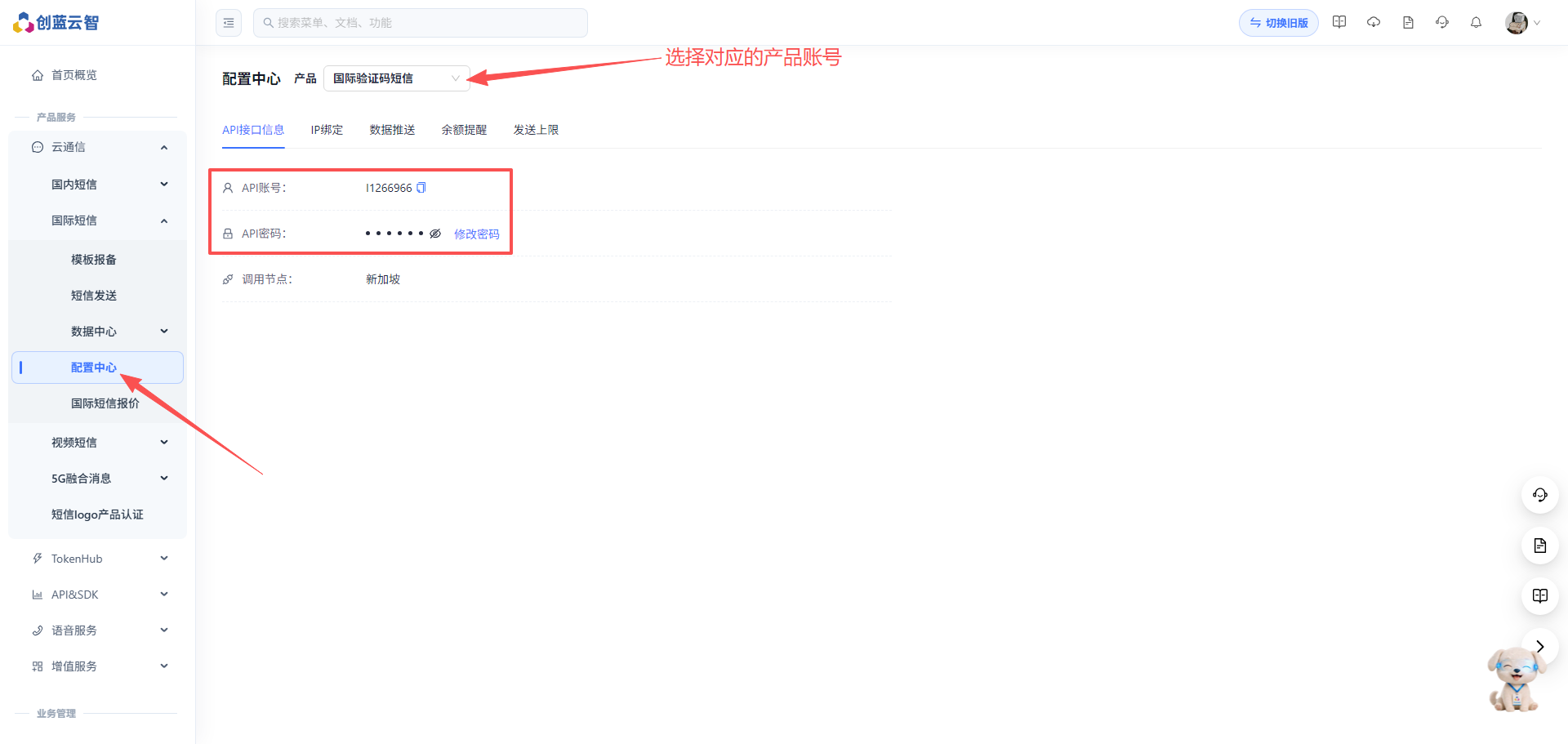
查询API账号信息
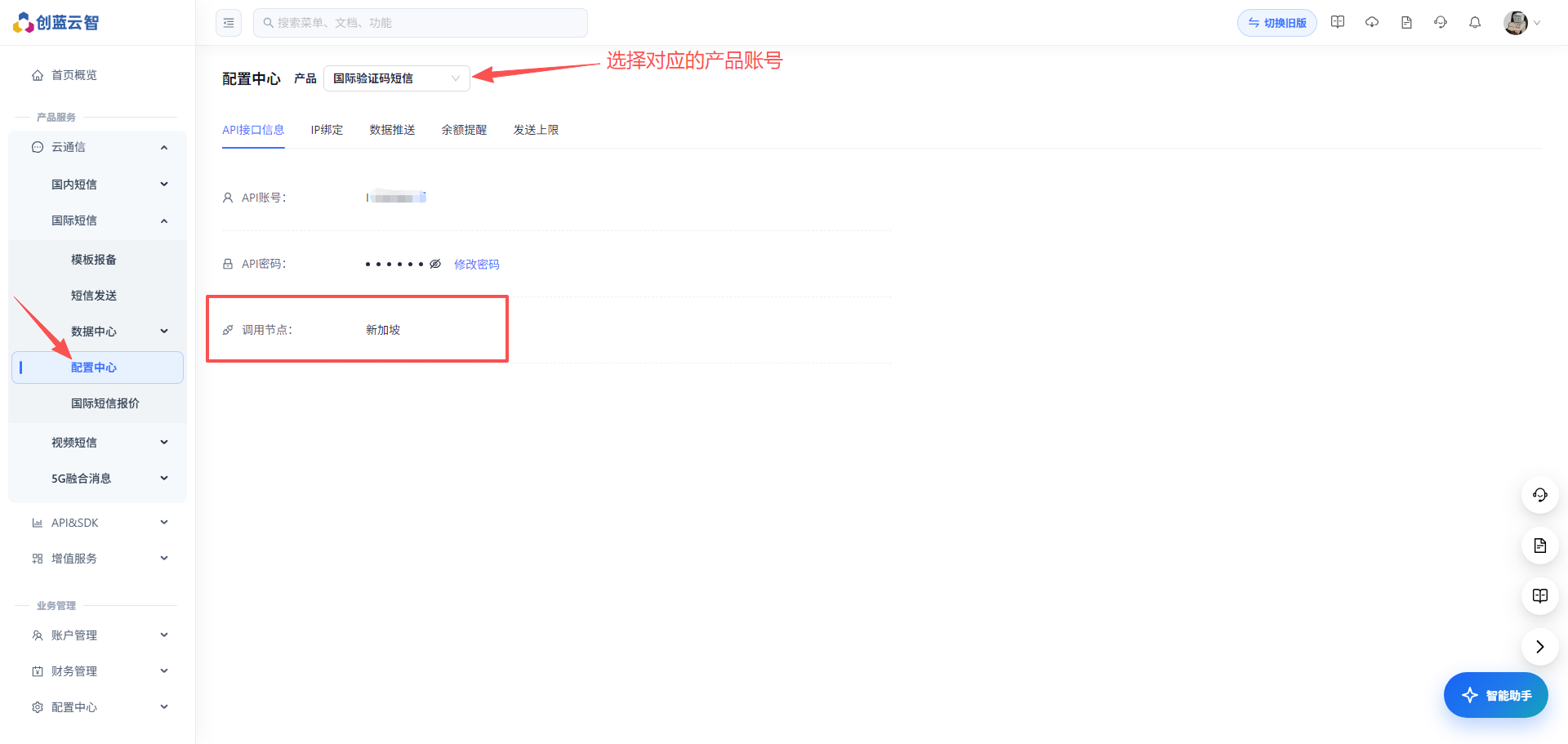
查询账号归属节点
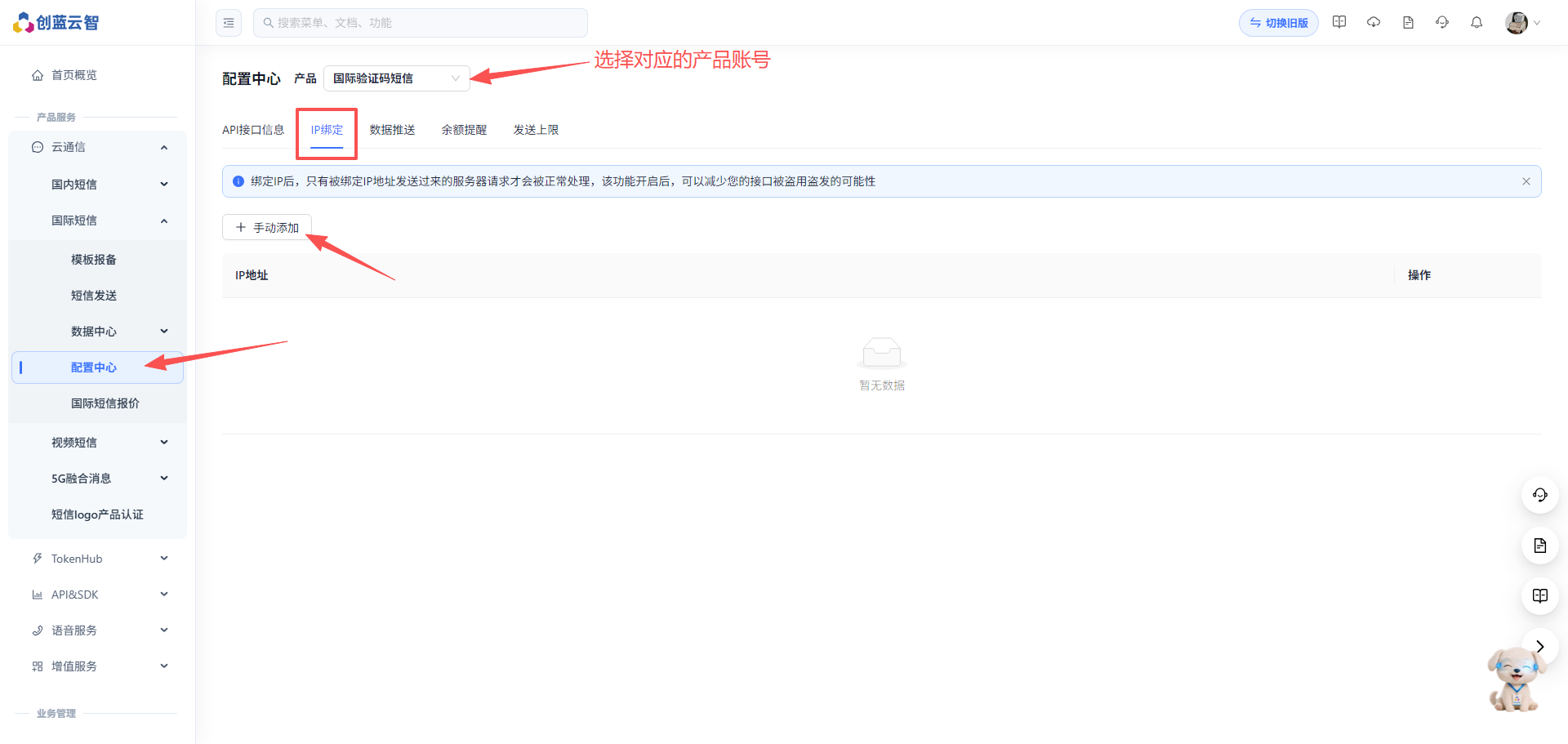
配置IP白名单
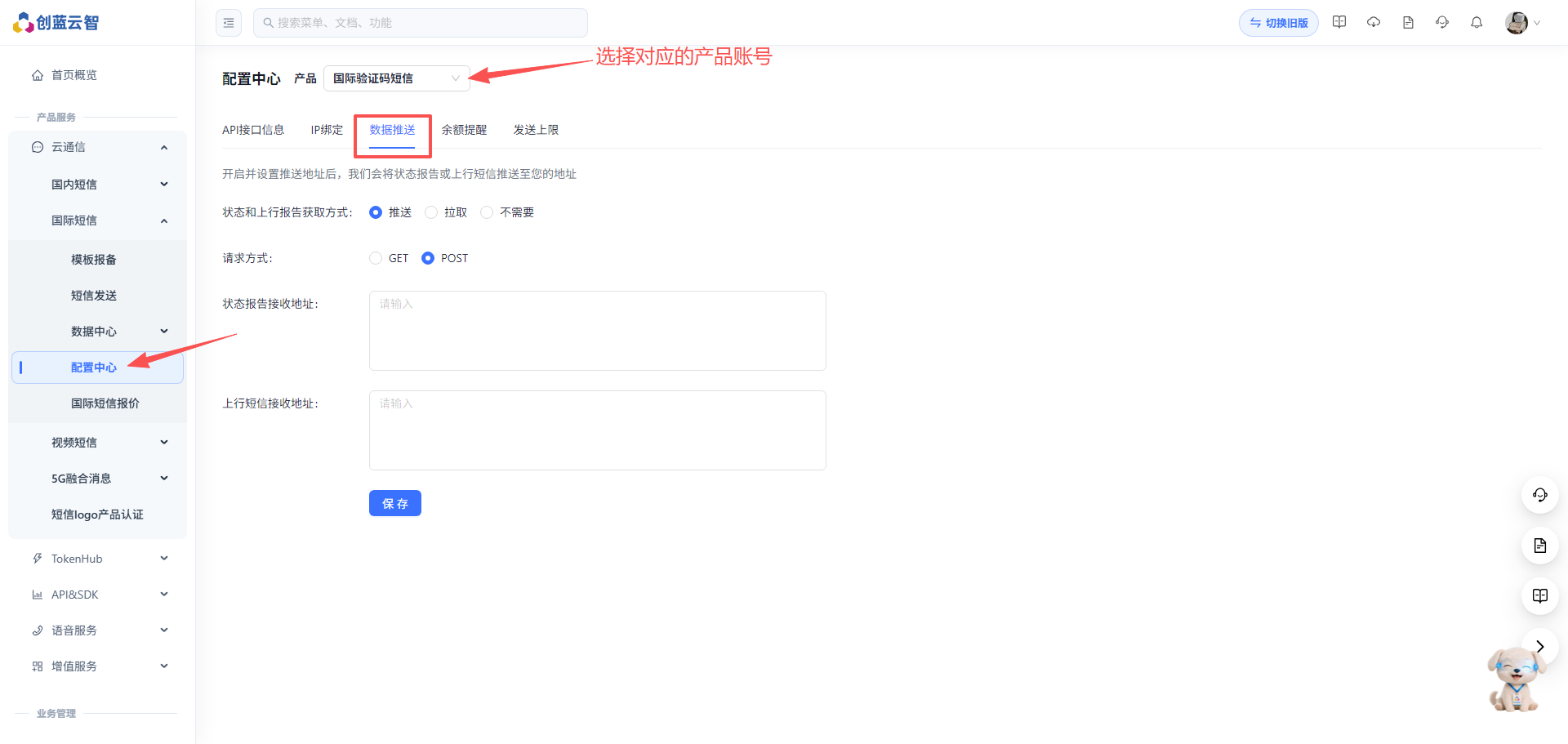
配置数据推送URL
3.2协议说明
| 名称 | 说明 |
|---|---|
| 协议 | HTTP POST |
| 编码格式 | UTF8 |
| Content-Type | application/json |
| URL(新加坡节点) | https://sg-intapi.tig253.com/send/sms |
| URL(上海节点) | https://intapi.tig253.com/send/sms |
请根据账号归属节点请求对应URL,否则可能会导致请求失败
3.3请求头
| 参数名 | 类型 | 是否必填 | 示例 | 说明 |
|---|---|---|---|---|
| sign | string | 是 | 54aefa13a6e86c119db54a6d07e8721b | 签名,请参考加签方式生成签名 |
| nonce | string | 是 | 1787279054149 | 毫秒级时间戳 |
3.4请求体
| 参数名 | 类型 | 是否必填 | 示例 | 说明 |
|---|---|---|---|---|
| account | string | 是 | I6000000 | API账号,以大写字母I开头,登录云通讯控制台获取 |
| mobile | string | 是 | 8615800000000 | 手机号码,格式为"国家码+手机号",不带+和00前缀。例如中国:8615800000000,美国:12025550100。批量发送时多个号码用英文逗号隔开,如8615800000000,8615800000001。长度5-20位 |
| msg | string | 是 | 【253】Your verification code is: 2530 | 短信内容,长度不超过3000个字符。发送至中国大陆时必须以【签名】开头且内容需提前报备 |
| senderId | string | 否 | ChuangLan | 收件人手机上显示的发件人名称。中国大陆不支持自定义;海外支持自定义,需提前联系创蓝商务申请注册 |
| uid | string | 否 | 2026082110001 | 客户自定义批次号,64个字符以内 |
| callBackUrl | string | 否 | https://your-domain.com/callback | 状态报告回调地址,需以http://或https://开头。不传则使用控制台配置的地址,请勿传入空格 |
| tdFlag | int | 否 | 0 | 退订功能标识:1=开启,0或null=关闭。 |
请求示例
// 请求头 sign: 54aefa13a6e86c119db54a6d07e8721b nonce: 1787279054149 Content-Type: application/json // 请求体 { "account": "I6000000", "mobile": "8615800000000", "msg": "【253】Your verification code is: 2530", "senderId":"ChuangLan", "uid": "2026082110001", "callBackUrl":"https://your-domain.com/callback" }
3.5响应体
| 名称 | 类型 | 示例 | 说明 |
|---|---|---|---|
| code | string | 0 | 状态码: 0-成功,非 0 标识失败 |
| message | string | 提交成功 | 状态码说明 |
| data | string | null | 消息体 |
响应示例-成功
单条发送成功:
{ "code": "0", "message": "提交成功", "data": { "messageId": "392752647001866752" } }
批量发送成功(含失败号码):
{ "code": "0", "message": null, "data": { "messageId": "B_I1266966_2608211442481190200032100001", "errorPhone": [ "111111111" ] } }
响应示例-失败
{ "code": "108", "message": "手机号码格式错误", "data": null }
多语言调用示例
Java
package com.chuanglan.intsms.demo; import com.alibaba.fastjson.JSON; import com.alibaba.fastjson.JSONObject; import com.alibaba.fastjson.TypeReference; import okhttp3.MediaType; import okhttp3.OkHttpClient; import okhttp3.Request; import okhttp3.RequestBody; import okhttp3.Response; import org.apache.commons.lang3.StringUtils; import org.springframework.util.DigestUtils; import java.io.IOException; import java.util.Map; import java.util.TreeMap; import java.util.concurrent.TimeUnit; /** * ChuanglanIntsmsDemo * * @author xuzhilu * @createdAt 2026/6/30 17:12 * @description 创蓝国际短信发送接口代码示例 */ public class ChuanglanIntsmsDemo { private static final String API_URL = "https://sg-intapi.tig253.com/send/sms"; private final OkHttpClient httpClient = new OkHttpClient.Builder() .connectTimeout(10, TimeUnit.SECONDS) .readTimeout(10, TimeUnit.SECONDS) .writeTimeout(10, TimeUnit.SECONDS) .build(); public static void main(String[] args) throws IOException { new ChuanglanIntsmsDemo().sendSms(); } public void sendSms() throws IOException { //替换为API账号的密码 String password = "You account password"; SmsSendRequest smsRequest = new SmsSendRequest(); smsRequest.setAccount("I123456"); smsRequest.setMobile("6289520123456"); smsRequest.setMsg("这是一条测试短信"); smsRequest.setUid("112233445566778899"); String nonce = String.valueOf(System.currentTimeMillis()); String sign = generateSign(password, smsRequest, nonce); String jsonBody = JSON.toJSONString(smsRequest); RequestBody body = RequestBody.create( MediaType.parse("application/json; charset=utf-8"), jsonBody ); Request request = new Request.Builder() .url(API_URL) .header("Content-Type", "application/json") .header("nonce", nonce) .header("sign", sign) .post(body) .build(); try (Response response = httpClient.newCall(request).execute()) { String result = response.body() != null ? response.body().string() : ""; System.out.println("响应结果: " + result); JSONObject rtn = JSON.parseObject(result); String code = rtn.getString("code"); if ("0".equals(code)) { System.out.println("提交成功"); String messageId = rtn.getJSONObject("data").getString("messageId"); System.out.println("messageId=" + messageId); } else { String.format("提交失败: code=%s, message=%s", code, rtn.getString("message")); } } } /** * 生成签名 * * @param password API账号密码 * @param smsRequest 发送请求参数 * @param nonce 一般为时间戳 * @return */ private String generateSign(String password, SmsSendRequest smsRequest, String nonce) { //使用TreeMap排序 TreeMap<String, String> paramMap = JSON.parseObject( JSON.toJSONString(smsRequest), new TypeReference<TreeMap<String, String>>() { } ); paramMap.put("nonce", nonce); StringBuilder sb = new StringBuilder(); for (Map.Entry<String, String> entry : paramMap.entrySet()) { if (StringUtils.isNotBlank(entry.getValue())) { sb.append(entry.getKey()); sb.append(entry.getValue()); } } //追加API账号密码 String signContent = sb.append(password).toString(); return DigestUtils.md5DigestAsHex(signContent.getBytes()).toLowerCase(); } /** * 国际短信发送请求实体 */ public static class SmsSendRequest { // API账号 private String account; // 短信接收号码,带区号,如:6289520123456 private String mobile; //短信内容 private String msg; //批次号 private String uid; public String getAccount() { return account; } public void setAccount(String account) { this.account = account; } public String getMobile() { return mobile; } public void setMobile(String mobile) { this.mobile = mobile; } public String getMsg() { return msg; } public void setMsg(String msg) { this.msg = msg; } public String getUid() { return uid; } public void setUid(String uid) { this.uid = uid; } } }
Python
import hashlib import json import time import requests class SmsSendRequest: """国际短信发送请求实体""" def __init__(self, account=None, mobile=None, msg=None, uid=None): # API账号 self.account = account # 短信接收号码,带区号,如:6289520123456 self.mobile = mobile # 短信内容 self.msg = msg # 批次号 self.uid = uid def to_dict(self): return { "account": self.account, "mobile": self.mobile, "msg": self.msg, "uid": self.uid, } class ChuanglanIntsmsDemo: """ 创蓝国际短信发送接口代码示例 """ API_URL = "https://sg-intapi.tig253.com/send/sms" def __init__(self): self.timeout = 10 # 超时时间(秒) def send_sms(self): # 替换为API账号的密码 password = "You account password" sms_request = SmsSendRequest( account="I123456", mobile="6289520123456", msg="这是一条测试短信", uid="112233445566778899", ) nonce = str(int(time.time() * 1000)) sign = self._generate_sign(password, sms_request, nonce) json_body = json.dumps(sms_request.to_dict(), ensure_ascii=False) headers = { "Content-Type": "application/json; charset=utf-8", "nonce": nonce, "sign": sign, } response = requests.post( self.API_URL, data=json_body, headers=headers, timeout=self.timeout, ) result = response.text print(f"响应结果: {result}") rtn = json.loads(result) code = rtn.get("code") if code == "0": print("提交成功") message_id = rtn.get("data", {}).get("messageId") print(f"messageId={message_id}") else: print(f"提交失败: code={code}, message={rtn.get('message')}") def _generate_sign(self, password, sms_request, nonce): """ 生成签名 :param password: API账号密码 :param sms_request: 发送请求参数 :param nonce: 一般为时间戳 :return: MD5签名字符串 """ # 按key字母排序(等价于Java的TreeMap) param_dict = sms_request.to_dict() # nonce 加入参数表一起排序 param_dict["nonce"] = nonce sorted_keys = sorted(param_dict.keys()) sb = [] for key in sorted_keys: value = param_dict[key] if value is not None and str(value).strip() != "": sb.append(key) sb.append(str(value)) # 追加API账号密码 sign_content = "".join(sb) + password return hashlib.md5(sign_content.encode("utf-8")).hexdigest().lower() if __name__ == "__main__": ChuanglanIntsmsDemo().send_sms()
PHP
<?php /** * ChuanglanIntsmsDemo * * @author xuzhilu * @createdAt 2026/6/30 17:12 * @description 创蓝国际短信发送接口代码示例 */ class ChuanglanIntsmsDemo { const API_URL = 'https://sg-intapi.tig253.com/send/sms'; private $timeout = 10; // 超时时间(秒) public function sendSms() { // 替换为API账号的密码 $password = 'You account password'; $smsRequest = new SmsSendRequest(); $smsRequest->account = 'I123456'; $smsRequest->mobile = '6289520123456'; $smsRequest->msg = '这是一条测试短信'; $smsRequest->uid = '112233445566778899'; $nonce = strval(round(microtime(true) * 1000)); $sign = $this->generateSign($password, $smsRequest, $nonce); $jsonBody = json_encode($smsRequest->toArray(), JSON_UNESCAPED_UNICODE); $headers = [ 'Content-Type: application/json; charset=utf-8', 'nonce: ' . $nonce, 'sign: ' . $sign, ]; $ch = curl_init(); curl_setopt($ch, CURLOPT_URL, self::API_URL); curl_setopt($ch, CURLOPT_POST, true); curl_setopt($ch, CURLOPT_POSTFIELDS, $jsonBody); curl_setopt($ch, CURLOPT_HTTPHEADER, $headers); curl_setopt($ch, CURLOPT_RETURNTRANSFER, true); curl_setopt($ch, CURLOPT_TIMEOUT, $this->timeout); curl_setopt($ch, CURLOPT_CONNECTTIMEOUT, $this->timeout); $result = curl_exec($ch); curl_close($ch); echo '响应结果: ' . $result . PHP_EOL; $rtn = json_decode($result, true); $code = $rtn['code'] ?? ''; if ($code === '0') { echo '提交成功' . PHP_EOL; $messageId = $rtn['data']['messageId'] ?? ''; echo 'messageId=' . $messageId . PHP_EOL; } else { $message = $rtn['message'] ?? ''; echo "提交失败: code={$code}, message={$message}" . PHP_EOL; } } /** * 生成签名 * * @param string $password API账号密码 * @param SmsSendRequest $smsRequest 发送请求参数 * @param string $nonce 一般为时间戳 * @return string MD5签名字符串 */ private function generateSign($password, $smsRequest, $nonce) { // 按key字母排序(等价于Java的TreeMap) $paramMap = $smsRequest->toArray(); // nonce 加入参数表一起排序 $paramMap['nonce'] = $nonce; ksort($paramMap); $sb = ''; foreach ($paramMap as $key => $value) { if ($value !== null && trim(strval($value)) !== '') { $sb .= $key; $sb .= $value; } } // 追加API账号密码 $signContent = $sb . $password; return strtolower(md5($signContent)); } } /** * 国际短信发送请求实体 */ class SmsSendRequest { // API账号 public $account; // 短信接收号码,带区号,如:6289520123456 public $mobile; // 短信内容 public $msg; // 批次号 public $uid; public function toArray() { return [ 'account' => $this->account, 'mobile' => $this->mobile, 'msg' => $this->msg, 'uid' => $this->uid, ]; } } // 入口 (new ChuanglanIntsmsDemo())->sendSms();
Node.js
const crypto = require('crypto'); const https = require('https'); /** * 国际短信发送请求实体 */ class SmsSendRequest { constructor({ account, mobile, msg, uid } = {}) { // API账号 this.account = account; // 短信接收号码,带区号,如:6289520123456 this.mobile = mobile; // 短信内容 this.msg = msg; // 批次号 this.uid = uid; } toDict() { return { account: this.account, mobile: this.mobile, msg: this.msg, uid: this.uid, }; } } /** * 创蓝国际短信发送接口代码示例 */ class ChuanglanIntsmsDemo { static API_URL = 'https://sg-intapi.tig253.com/send/sms'; constructor() { this.timeout = 10000; // 超时时间(毫秒) } static main() { new ChuanglanIntsmsDemo().sendSms(); } sendSms() { // 替换为API账号的密码 const password = 'You account password'; const smsRequest = new SmsSendRequest({ account: 'I123456', mobile: '6289520123456', msg: '这是一条测试短信', uid: '112233445566778899', }); const nonce = Date.now().toString(); const sign = this._generateSign(password, smsRequest, nonce); const jsonBody = JSON.stringify(smsRequest.toDict()); const url = new URL(ChuanglanIntsmsDemo.API_URL); const options = { hostname: url.hostname, path: url.pathname, method: 'POST', headers: { 'Content-Type': 'application/json; charset=utf-8', 'nonce': nonce, 'sign': sign, 'Content-Length': Buffer.byteLength(jsonBody), }, timeout: this.timeout, }; const req = https.request(options, (res) => { let result = ''; res.setEncoding('utf-8'); res.on('data', (chunk) => { result += chunk; }); res.on('end', () => { console.log('响应结果: ' + result); const rtn = JSON.parse(result); const code = rtn.code; if (code === '0') { console.log('提交成功'); const messageId = (rtn.data || {}).messageId; console.log('messageId=' + messageId); } else { console.log(`提交失败: code=${code}, message=${rtn.message}`); } }); }); req.on('error', (e) => { console.error('请求异常: ' + e.message); }); req.write(jsonBody); req.end(); } /** * 生成签名 * * @param {string} password - API账号密码 * @param {SmsSendRequest} smsRequest - 发送请求参数 * @param {string} nonce - 一般为时间戳 * @returns {string} MD5签名字符串 */ _generateSign(password, smsRequest, nonce) { // 按key字母排序(等价于Java的TreeMap) const paramMap = smsRequest.toDict(); // nonce 加入参数表一起排序 paramMap.nonce = nonce; const sortedKeys = Object.keys(paramMap).sort(); let sb = ''; for (const key of sortedKeys) { const value = paramMap[key]; if (value !== null && value !== undefined && String(value).trim() !== '') { sb += key; sb += value; } } // 追加API账号密码 const signContent = sb + password; return crypto.createHash('md5').update(signContent, 'utf-8').digest('hex').toLowerCase(); } } // 入口 ChuanglanIntsmsDemo.main();
4.接口响应码
| 状态码 | 描述 |
|---|---|
| 0 | 提交成功 |
| 101 | 账号不存在 |
| 102 | 密码错误 |
| 103 | 拉取条数格式错误 |
| 104 | 拉取条数不在范围内 |
| 105 | 批次编号大于64位 |
| 106 | 短信内容长度超过3000字符限制 |
| 108 | 手机号码格式错误 |
| 109 | 手机号码个数错误,批量提交手机号码不能超过2000个 |
| 110 | 余额不足 |
| 112 | 产品配置错误 |
| 114 | 客户端IP错误 |
| 116 | 账号已删除或禁用 |
| 118 | 账号不能为空 |
| 119 | 账号不在当前节点 |
| 123 | 短信内容不能为空 |
| 124 | 简介或验证码不能为空 |
| 128 | 账号长度超过50位 |
| 129 | 产品价格配置错误 |
| 130 | 未知异常 |
| 131 | 超过日发送上限 |
| 132 | 超过月发送上限 |
| 134 | 超过反投诉限制 |
| 135 | 短信内容不匹配 |
| 136 | 短信计费失败 |
| 137 | 账号发送类型与当前api接口不匹配 |
| 138 | 手机号发送黑名单限制 |
| 139 | whatsApp模板ID匹配错误 |
| 140 | 超过日发送金额上限 |
| 142 | 新用户需要配置ip白名单 |
| 143 | 价格不存在 |
| 144 | 模板ID错误或未审核 |
| 145 | 超过月发送金额上限 |
| 146 | 宵禁时间限制 |
| 148 | 通道发送上限 |
| 149 | 账户发送开关关闭 |
| 150 | 子账号依附计费配置有误 |
| 151 | 报价国家未开启 |
| 152 | 产品账号报价不存在 |
| 153 | 依附计费的主账号不存在 |
| 154 | 产品账号计费方式不存在 |
| 155 | 账户未开通统一计费 |
| 156 | 产品账号已禁用 |
| 157 | 账户余额不足 |
| 158 | 授信额度不足 |
| 159 | 客户未开通统一钱包 |
| 160 | 香港营销短信拒收号码 |
| 161 | 香港未授权#号sender使用 |
5.回执状态码
| 状态码 | 描述 |
|---|---|
| DELIVRD | 短信发送成功 |
| UNKNOWN | 未知短信状态 |
| REJECTD | 短信被短信中心拒绝 |
| MBBLACK | 目的号码是黑名单号码 |
| SM11 | 网关验证号码格式错误 |
| SM12 | 我方验证号码格式错误 |
| 其他 | 网关内部状态 |
这篇文档对您有帮助吗?